










/ month


/ month


/ month
quarterly commitment
Yes, there's a better way to hire an AI slide designer




4,000+ companies didn’t wait. They’re onboard.
































Why awesomic





0.82% talent





One subscription and your hiring problems solved


We say no to 99.18% of AI slide designers




FAQ


How quickly can I start working with a AI slide maker?
You can start working with an AI slide maker instantly. Just subscribe, submit your project, and get your first deliverables within 24 hours. The process includes daily updates and unlimited revisions, ensuring fast, high-quality results without the wait of hiring or onboarding.
Can I hire an AI slide designer for short-term or one-off projects?
Yes, you can hire AI slide designers for short-term or one-off projects through Awesomic’s subscription model. Submit your task, and get matched with vetted experts who deliver high-quality slides with unlimited revisions and daily updates. Flexible, fast, and no long-term contract needed.
Are AI slide designers experienced in startups, SaaS, or enterprise teams?
Yes. Our AI slide designers have 7 to 15+ years of experience working with startups, SaaS, and enterprise companies. They’ve contributed to projects for Y Combinator-backed startups, FinTech, HealthTech, and global brands. Expect fast, top-quality slide decks made with practical expertise.
Can I switch AI slide designers if my needs change?
Absolutely. With Awesomic, you can switch AI slide designers anytime at no extra cost. Our subscription model lets you adapt quickly, ensuring the best match for your evolving project needs. Enjoy daily updates, unlimited revisions, and seamless talent rematches for top results.
What does “top 1% designers” actually mean?
It means only the best 0.82% of AI slide deck designers pass a strict vetting process. This includes portfolio checks, multi-step skill tests, community reviews, and final approval to ensure expert-level quality, fast delivery, and seamless communication every time.
How many revisions are included?
Every subscription with Awesomic’s AI slide maker includes unlimited revisions. You get daily progress updates and can request changes as often as needed. This ensures your slides turn out exactly how you want, without limits or extra costs.
Is this cheaper than hiring a full-time AI slide designer?
Yes. Our AI slide creator costs $499 per month for high-quality, production-ready slides across projects. Hiring a full-time AI slide designer typically means a $60K+ annual salary plus overhead. Our subscription saves you at least 70% while delivering faster, unlimited revisions, and flexible scaling.
Can I pause or cancel my AI slide designer subscription at any time?
Yes, you can pause or cancel your AI slide designer subscription whenever you want. No long-term contracts or hidden fees hold you back. Manage your plan easily to fit your project flow—flexibility is built right into the subscription.
Do AI slide designers work in my time zone?
Yes. Our AI slide designers operate globally and match your schedule. Receive daily updates and quick turnarounds, with tasks delivered in as little as 24 hours. Scale easily by adding subscriptions—no delays, just fast, reliable results anytime you need.
Can I work with the same AI slide deck designer long-term?
Absolutely. With Awesomic, you get a dedicated AI slide deck designer available full or part-time, backed by a project manager to ensure smooth communication and on-time delivery. Switch or rematch talent anytime at no extra cost. Enjoy daily updates and unlimited revisions for consistent, quality results.

Related roles you may need


Hiring guide:


What does an AI slide designer actually do?
If you’re wondering what to expect when you hire an AI slide designer, you’ll find their role goes beyond making pretty slides. They design products or features that use AI in smart ways. First, they start by defining AI use cases—pinpointing specific user problems where AI can add real value. For example, they might work on image recognition to improve how users sort photos, or natural language processing to help users talk to software naturally. Predictive analytics is another spot where AI helps guide decisions.
Then comes shaping user flows. AI isn’t just a feature to plug in—it needs to fit naturally in the user journey. A good AI slide maker ensures that AI-driven steps feel logical and don’t confuse users. Reducing cognitive load is key. This means designing smooth transitions and clear feedback so users feel AI is helping, not complicating.
Working with data experts is part of the job too. AI behaviors depend heavily on data quality, so designers collaborate closely with data scientists and engineers. Understanding what data goes in, how clean or messy it is, and where it might fall short helps designers manage expectations and design fallback options.
Making the AI output useful and clear is critical. Imagine a slide with complex AI outputs but no clear explanation—users won’t know what to do. Designers create visualizations that are easy to interpret, add confidence indicators to communicate certainty levels, and plan for fallback options when AI results are shaky.
Transparency and trust are big themes when you hire an AI slide designer. Explaining AI decisions in simple language and using visual cues like highlights or annotations helps users understand what’s happening behind the scenes. Testing these explanations with real users ensures that people don’t just trust AI blindly but feel comfortable using it.
Practical methods shine here. User interviews validate if AI is actually useful. Tools like Figma or Adobe XD help prototype AI interactions quickly and get feedback. Designers also lean on frameworks like Google’s People + AI Guidebook, which focuses on human-centered AI design principles.
One thing I’ve noticed is how our platform, Awesomic, can really speed up this whole process. We provide access to expert designers who know how to blend AI-driven design elements with smooth prototyping. Companies can quickly engage top talents through our subscription model, speeding up iterative design and feedback cycles. This means you get AI slide designs that are user-friendly, trustworthy, and transparent—without wasting time hunting for experts.
When do you need to hire an AI slide designer?
You might ask yourself, when is the right time to hire an AI slide designer? It’s easier than you think to spot these moments.
For starters, if your product is adding AI from scratch, you’ll need someone to design how AI fits into every workflow and interface from day one. This isn’t a side job—it needs a conscious plan to weave AI outputs seamlessly into the user experience.
But that’s not all. Sometimes your AI feature works but feels confusing or unreliable to users. Maybe your feedback shows people don’t trust the AI’s results or find the interface unclear. That’s when hiring an AI slide creator can change the game by better explaining AI capabilities or cleaning up how outputs are shown.
Here are some signs that tell you it’s time:
- Users say, “The AI works, but the UX feels confusing.”
- Feedback reveals trust issues around AI results.
- You plan to scale AI features across multiple platforms like mobile and desktop.
- You’re adding advanced AI features like conversational AI or personalized recommendations.
- You want to build explainability layers that require specialized slide design efforts.
As AI features grow more complex, typical UX design skills might not cover all gaps. You need someone who understands AI deeply and can bridge tech and user experience smoothly. Also, when your AI workflows get tricky, a specialist is worth it.
This is where Awesomic shines again. Hiring through our platform means you quickly connect with highly vetted AI-focused designers on subscription plans. You skip long hiring processes and build up your AI slide design capabilities flexibly, matching evolving AI product needs fast.
What skills should a great AI slide designer have?
If you wonder what makes a top AI slides designer, it’s a mix of foundational design skills and AI know-how. I’d break it down into these core areas:
- UX fundamentals: solid skills in user research, wireframing, prototyping, A/B testing. You want someone who knows how to build user journeys that actually work.
- AI basics: understanding supervised and unsupervised learning, key metrics like accuracy and recall, and tokenization especially for NLP tasks. It’s important they grasp how AI models learn and perform, even if they’re not coding.
- Prompt design expertise: especially for generative AI, knowing how to design input prompts that get clear and relevant outputs is critical.
- Data thinking: analyzing datasets, spotting bias, understanding data lifecycles. Close collaboration with data teams makes their designs realistic and effective.
- Clear communication: translating complex AI concepts into simple visuals and copy users can easily follow.
- Tools: mastery of design platforms like Figma, Sketch, Adobe XD; AI experiment platforms such as Runway ML, OpenAI Playground, Google Teachable Machine; data visualization tools like Tableau or D3.js; and usability testing platforms like UserTesting or Lookback.
- Processes: use of design sprints focused on AI, iterative testing with live AI models, empathy mapping for frustrations users face with AI.
- Ethics and accessibility: awareness of ethical AI design principles, privacy concerns, and accessibility standards.
When you hire an AI slide designer via Awesomic, you’re tapping into a talent pool where candidates have been thoroughly vetted for exactly these skills. Our designers are experienced in AI UX/UI design, and they stay updated on the latest AI tech and design systems. This sets Awesomic apart from traditional hiring and speeds up finding highly qualified AI slides designers.
What types of AI slide designers can you hire?
Now you might be wondering who exactly you can hire for your AI slide needs. The choice really depends on your project’s size, urgency, and budget. There are several types:
- Freelancers: great for short-term projects or prototypes. They bring flexibility and specialized skills without long-term commitments.
- In-house designers: embedded in product teams, perfect for ongoing AI feature development and close teamwork with engineering.
- Agencies: large teams with cross-disciplinary expertise. Agencies cover UI design, AI research, and development, ideal for complex full-product AI integrations.
- Specialists: prompt designers focus on crafting AI input prompts for generative models; AI product designers oversee the entire lifecycle from data to deployment.
How to decide? If you have a pilot project, freelancers work well and keep costs manageable. Large-scale launches can benefit from agencies that bring many skilled people at once. For continuous AI features and quick iteration, in-house teams make sense.
Often, a hybrid approach works best. Combining in-house staff with freelance specialists keeps your team agile and ready for urgent needs.
Speaking from experience, our platform Awesomic offers a hybrid subscription marketplace. This means you get on-demand access to vetted freelancers, specialists, and even full-time contractors with flexible plans like 1 to 1. This model lets you augment your team without overhead or lengthy hires.
Here’s a quick comparison table:
| Designer type | Best for | Speed | Budget | Expertise |
|---|---|---|---|---|
| Freelancer | Pilot projects, prototypes | Fast | Low to medium | Specialized, flexible |
| In-house | Continuous AI feature development | Moderate to fast | Medium to high | Deep product knowledge |
| Agency | Large scale launches, complex builds | Moderate | High | Cross-disciplinary teams |
| Specialist | Prompt design, niche AI product roles | Fast | Medium | Deep AI focus |
How much does it cost to hire an AI slide designer?
Talking dollars here, the cost to hire an AI slide designer varies widely—but I’ll break it down to help you budget smartly. There are a few common pricing models:
- Hourly rates: typically range from $50 to $150+ per hour based on experience with AI products, location, and seniority.
- Fixed project fees: simple AI UX tasks might run $5,000 to $15,000, but full AI product designs with multiple features can exceed $50,000.
- Retainer agreements: steady monthly fees to keep a designer available for ongoing work.
You’ll often pay more for AI slide designers versus general UX designers because AI design needs deep knowledge of AI models, data handling, and making outputs interpretable for users.
Factors affecting cost:
- Experience with specific AI tools like TensorFlow or PyTorch interfaces.
- Complexity of AI use cases—computer vision tasks often cost more than chatbot prompt designs.
- Project scope such as the number of AI features and platforms.
- Need for user testing on real AI data.
- Fast turnaround requirements or ongoing AI model iteration support.
Negotiation tips: Tie payments to AI-specific milestones like prototype testing, usability evaluation of AI outputs, or documentation of AI UX guidelines.
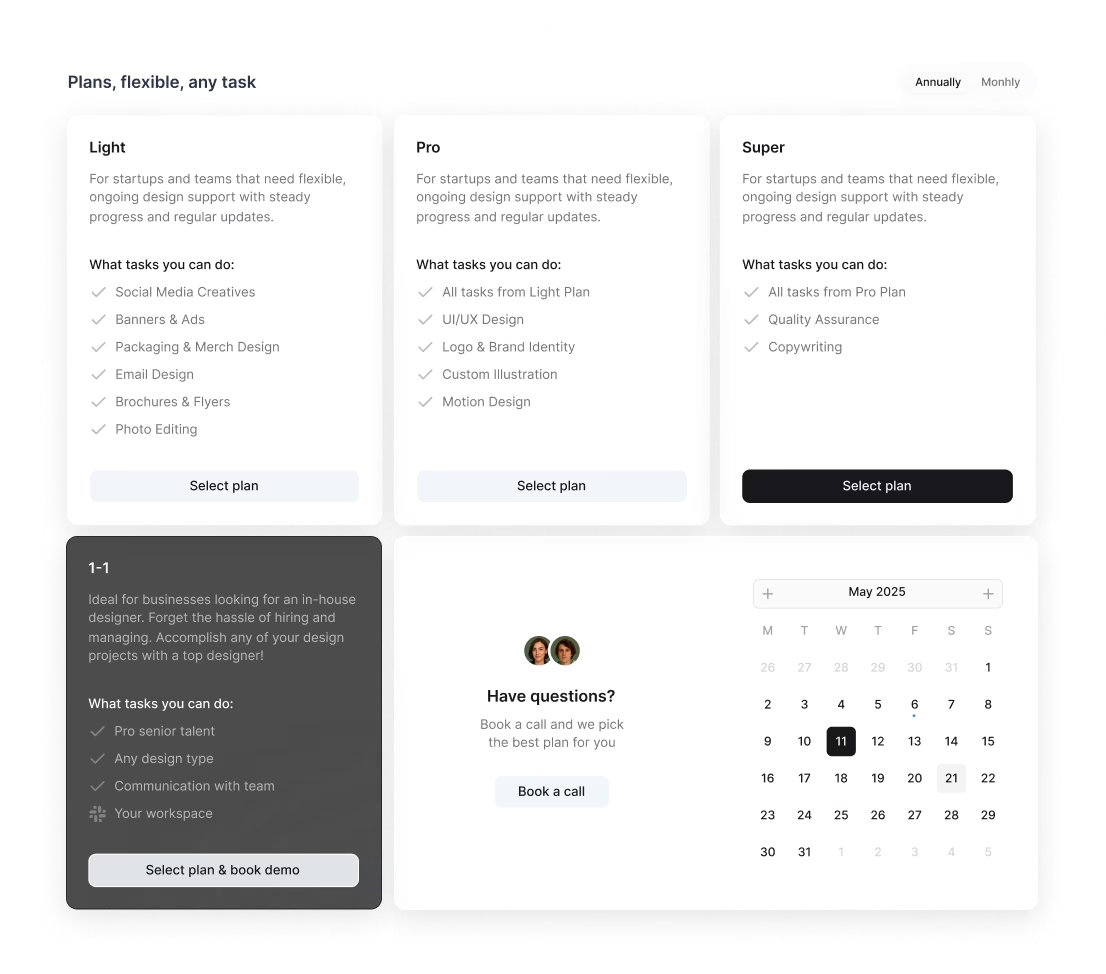
Our platform Awesomic offers transparent subscription pricing. Plans start at $990/month for Light, going up to $4990/month for Super. These include unlimited revisions, daily updates, and flexible scaling. This model often saves money compared to traditional freelancing or agencies since there are no hidden fees or lengthy contracts.
Where can you find the right AI slide designer?
Finding the right AI slide designer can feel like hunting for a needle in a haystack, but there are solid places to start:
- Design platforms like Behance, Dribbble, and LinkedIn where designers showcase their AI-focused portfolios.
- AI product communities such as AI Product Playbook Slack, OpenAI Forum, or specialized Discord servers where AI designers and prompt engineers collaborate.
- Referrals from AI product managers, engineering leads, or UX teams experienced in AI.
- Agencies specializing in AI like Element AI and Fjord or boutique AI UX consultancies.
- Job boards targeting AI roles — AngelList, AI Jobs Board, and niche freelancer platforms like Toptal.
- Networking at AI design conferences and workshops, for example UXDX AI or AI Expo, where you meet experts face to face.
- Posting short AI design challenges on platforms like UX Challenge or Crossover to test candidates’ skills quickly.
If you want to skip the search hassle, our platform Awesomic is a premier talent marketplace. We rigorously vet designers—accepting less than 1% of applicants—and match you with top AI and UX experts within 24 hours. Using Awesomic means you get access to AI slide creators with relevant experience without the endless searching and interview stress.
How do you evaluate an AI slide designer’s portfolio?
When you’re ready to hire an AI slide designer, a well-curated portfolio is a goldmine. Here’s what you want to look for:
- Clear AI use cases described in detail. What problem did AI solve? How did design contribute?
- How the designer handles uncertainty in AI outputs. Look for fallback UX patterns, confidence intervals, or error states shown.
- Evidence of building user trust and understanding through explainability features, progressive disclosure, or interactive feedback loops.
- Stories about user research with AI and collaboration with data teams to handle AI model constraints.
- Prototypes and wireframes that display AI-driven user flows clearly.
- Metrics or feedback showing better AI feature adoption or less user confusion.
- Use of AI-specific frameworks, tools, or prompt engineering explained.
- Diversity in AI domains covered such as NLP, computer vision, or recommender systems.
An easy way to find these good portfolios is through Awesomic’s platform. All designers there are vetted, and they share AI product designs showcasing case studies with measurable impact and real client feedback. You get peace of mind knowing your hire has the right experience before engagement.
What questions should you ask before hiring?
Before you hire an AI slide maker, asking the right questions can save loads of trouble later. Here are some I recommend:
- Can you describe an AI feature you designed and your role in that process?
- How did you incorporate AI limitations (like uncertainty) into your UX design?
- What strategies do you use when AI outputs are unclear or fail?
- How do you communicate AI confidence or errors to users?
- How do you work with engineers and data scientists to align design with AI capabilities?
- What tools or processes do you use to test AI features during development?
- How do you validate AI user flows before launch?
- What methods do you use for usability testing focused on AI outputs?
- Have you designed input prompts or instructions for generative AI models?
- What’s your approach to ethical AI design and handling privacy concerns?
You don’t have to figure this out by yourself, though. Our platform Awesomic helps in this vetting by screening candidates for communication skills and relevant experience. You can also request interviews or test tasks right in the platform to get a hands-on feel for fit.
How do you work successfully with an AI slide designer?
Working well with an AI slide creator means building a partnership based on clear goals and communication. Here’s how to set up for success:
- Set clear goals aligned with both product and AI outcomes. Include measurable success criteria like improved user trust or AI-driven decision accuracy.
- Share data access and context early. Make sure the designer understands what AI model inputs, features, and limits exist.
- Keep regular syncs with engineers and data scientists for quick feedback on AI feasibility and performance.
- Test prototypes early with real AI outputs, not placeholders, to catch UX issues tied to AI behavior.
- Establish feedback loops focused on both UI and AI output quality, including interpretability.
- Run cross-disciplinary workshops or design sprints focused on AI challenges such as bias mitigation or explainability.
- Maintain respectful, transparent communication about what AI can and can’t do, and iterate based on data.
- Document AI UX decisions clearly for team scaling and knowledge sharing.
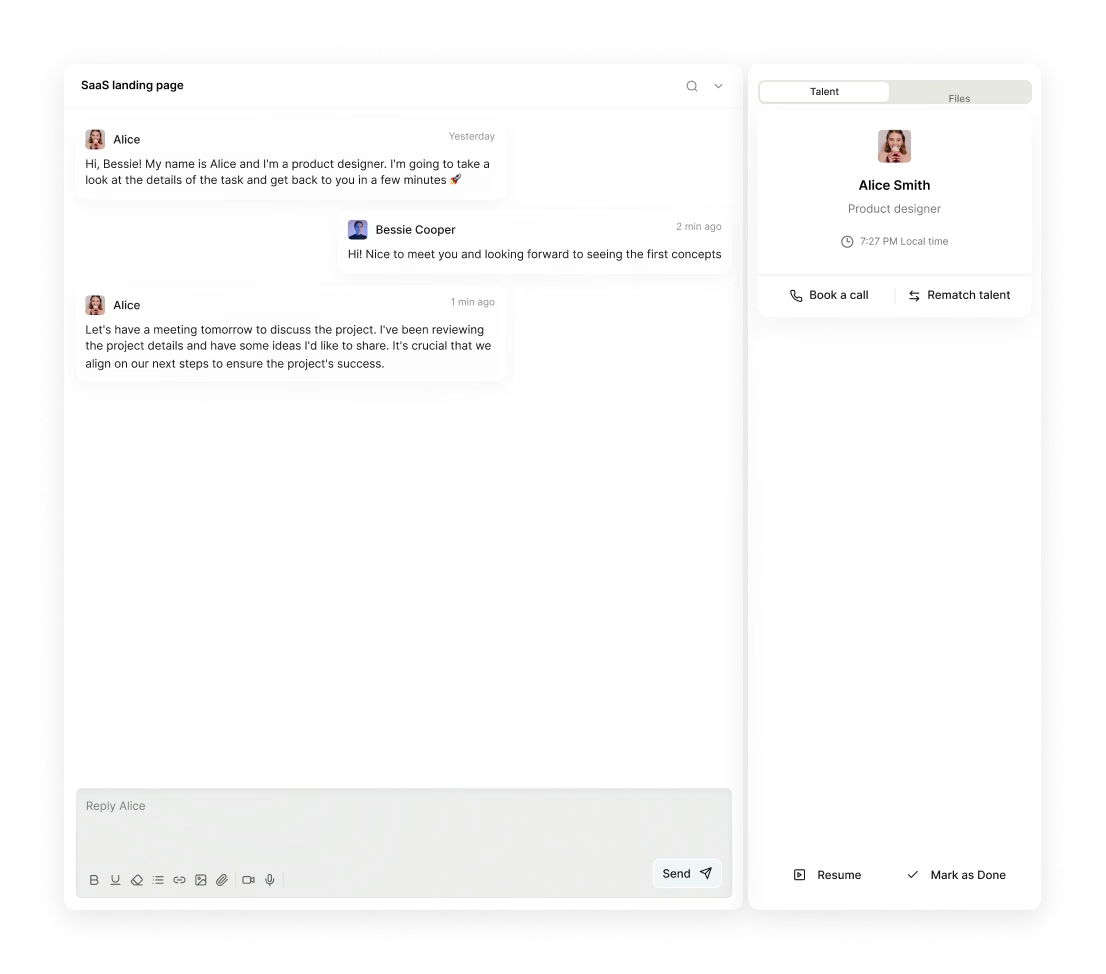
Our platform Awesomic makes this collaboration smoother by providing integrated chat, Slack integrations, and daily updates with matched designers. This speeds up iteration cycles and helps keep AI slide design projects on track.
How do you know you hired the right AI slide designer?
How can you tell you’ve found the best AI slide designer? Look for these positive signs:
- Users understand AI features better, demonstrated via interviews, surveys, or fewer support tickets about AI confusion.
- Increased usage and adoption of AI-driven features show that the AI feels approachable and valuable.
- Fewer negative comments about AI reliability or transparency prove successful trust-building.
- The designer collaborates smoothly with engineers, data scientists, and product teams, showing clear communication and shared AI knowledge.
- Timely delivery of practical prototypes and design specs that realistically integrate AI behavior.
- Positive impact on key business metrics like conversion lift from AI recommendations or efficiency gains from AI automation UX.
- The designer actively solves AI uncertainty or ethical issues, showing proactive problem solving.
We back this up on Awesomic by sharing testimonials and case studies from repeat clients. This way, you get confidence that you have the best AI slide designer working on your needs, not just any freelancer.
Bringing an AI slide designer on board is an investment that pays off when done right. Whether you’re starting fresh or scaling AI features, knowing what to look for and where to find talent helps you build AI experiences people trust and love. Platforms like Awesomic make the entire journey smooth—from discovery to collaboration and delivery—helping you create AI slide designs that don’t just inform but truly engage users.


