 Awesomic Team
If you're reading this on awesomic.com, you're no longer on Webflow. Every page here is a static Next.js build, written and shipped by AI agents working in Awesomic, the same product we sell.
It didn't happen in one go. Our first test was in mid-August, and it was deliberately small: take one page, the homepage, and see how it works. We spent the next few weeks experimenting, learning what agents do well and where they quietly fail. Then we threw that away and started again from a clean codebase. From the first commit of that rebuild to the live site took 11 days.
This post covers why we left Webflow, how the new setup works, the five things that broke along the way, and the rule we wrote after each one.
Why we left Webflow
Webflow served us well for years. But once we had a tool that covered everything the site needed, keeping it there stopped making sense. Three things decided it.
Real version control. In Webflow, the history of a page is a list of publishes. Now every change is a commit with a message that says what changed and why. If something goes wrong, rolling back means releasing the previous good commit. Nobody has to remember what the page looked like last Tuesday.
A team that can actually work at the same time. On Webflow, two people editing the site meant taking turns. Now each task runs in its own chat, on its own branch. One person reworks the pricing page, another adds blog posts, a third fixes the footer. Each piece merges back into main when it's ready.
Developers don't wait on designers. Our brand guide lives in the repository as a plain file: colors, type, radii, button recipes, voice. Agents read it before any visual work. So when a page needs a new section, nobody has to ping a designer to ask for the exact gray or the corner radius on a card. Designers still set the direction. They just stop being a lookup service.
How it works now
Here's the whole pipeline in one line: a staging project, main on GitHub, a production project, and the live domain.
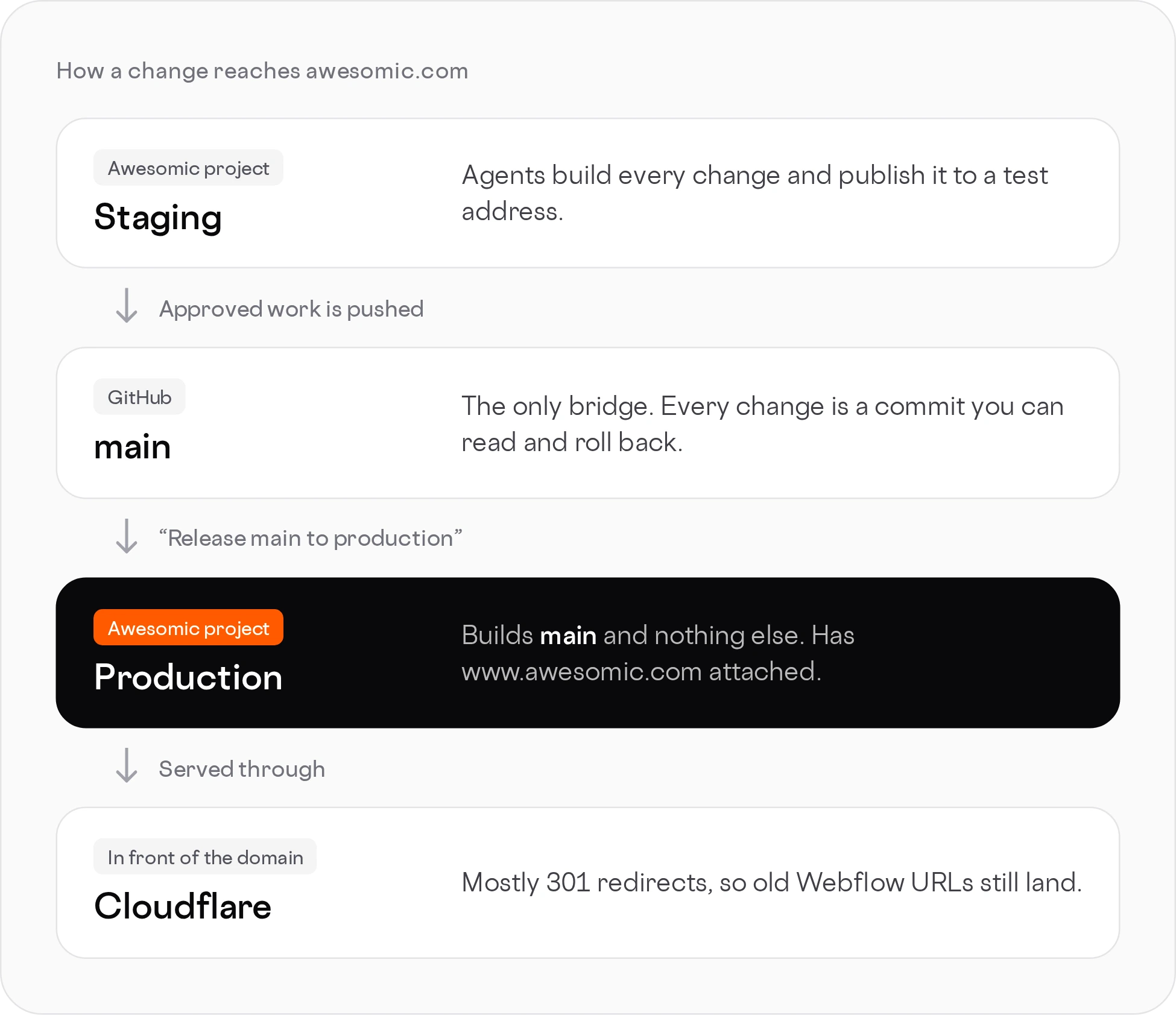
main.Every Awesomic project is a cloud computer with the code, the files and the brand context in one place. Agents work in chats inside it. We run the same repository in two of these projects, one for staging and one for production. GitHub sits between them. Cloudflare sits in front of the domain, mostly to handle redirects.
That split is the most important decision we made, so it gets its own section.
Staging and production: two projects, one rule each
For most of the build we didn't need a production environment at all. The live site was still on Webflow. Everything happened in one project, and we checked the results on a preview address. Publishing was safe because nothing we published could reach awesomic.com.
That changed the day before the switch. Once the new site was going to serve the real domain, any publish could become a release. So on October 15 we split the work across two Awesomic projects running the same code:
- Staging builds and publishes every change to a test address. Someone asks for a fix, the agent makes it, rebuilds, and publishes it to staging. A change that isn't published isn't done.
- Production has www.awesomic.com attached. It publishes only when someone explicitly says "release main to production." A request to fix, update or build something in this project gets a polite no and a pointer back to staging.
mainon GitHub is the only bridge between them. Approved work moves from staging tomain. Production buildsmainand nothing else.
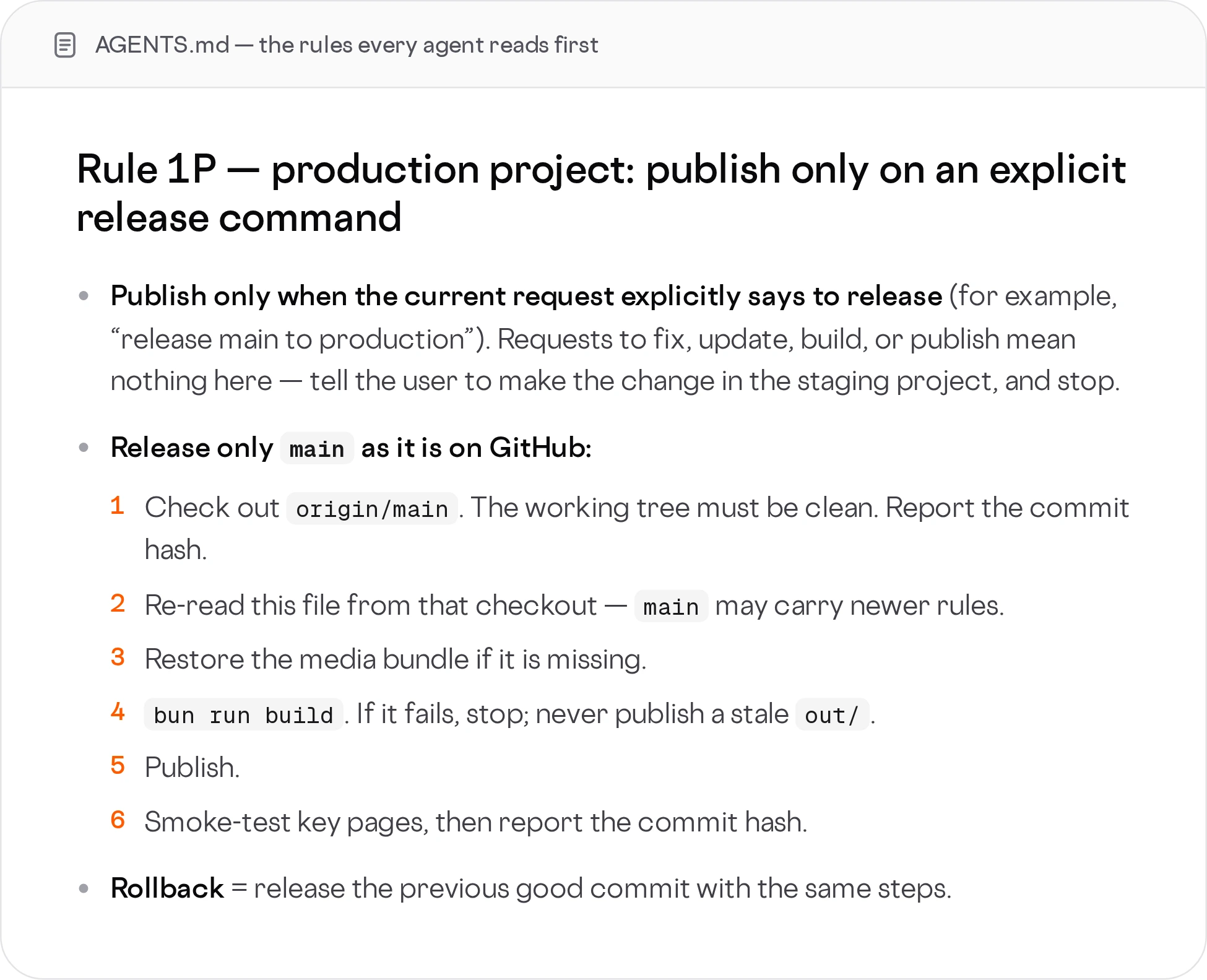
These rules aren't in anyone's head. They live in a file in the repository that every agent reads before it starts. On a release, the production agent checks out a clean main, reads the rules again from that checkout in case they've changed, builds the site, and stops if the build fails. If the build passes, it publishes, smoke-tests key pages and reports the commit hash it shipped.
Cloudflare in front of the domain mostly handles 301 redirects. Old Webflow URLs still work: /about-us takes you to /about.
Two moments showed us this setup works.
The first was a refusal. On October 21 we attached our domains to the production project. The next release request was turned down: the rule at the time said production must never have a custom domain. The agent did exactly what it was told. We updated the rule in one commit, and the release went ahead a few minutes later. That's the behavior you want: when the rules and reality disagree, the agent stops and a person decides.
The second was speed. When the new homepage and pricing page were ready, they went from commit to production in minutes, with a full build, the checks and a smoke test in between.
Five things that broke, and the rule each one gave us
None of these were dramatic. Each one taught us something, and each lesson became a rule the build now enforces.
1. "Done" didn't mean done
In September, a review showed that 279 of the 282 pages we thought we had rebuilt were really mirrors of the Webflow export. They looked right. Under the hood they were the old site, served from a new address.
That was the moment we stopped and started again from a clean codebase. It also changed how we take a report from an agent. "Done" now means something you can open and check: a build that passes, a page on the preview address, a commit with a hash.
We were also honest with ourselves about scope. The homepage, the blog, the hiring pages and the navigation are new code. A good part of the rest, including case studies, service pages and legal pages, kept its original Webflow layout for launch. The build takes that markup from the archived Webflow export and renders it as static pages inside the new site. Some of those pages still load a self-hosted copy of Webflow's interaction script to run sliders and tabs. We're replacing them one at a time.
The rule: a task is finished when the result is published and someone can open it, not when an agent says so.
2. An old Webflow script fought the new menu
Right after launch, the menu misbehaved on some pages. The cause was Webflow's own script, which still tried to control navigation and competed with the new React menu for the same elements.
We took navigation away from it. The menu is now fully owned by React on every page, including the ones that kept their Webflow layout.
The rule: every element has one owner. If React renders it, no Webflow script touches it.
3. Pages without their own SEO title
Some pages shipped without a title and description of their own. They quietly fell back to the homepage's metadata, which to Google looks like several copies of the homepage.
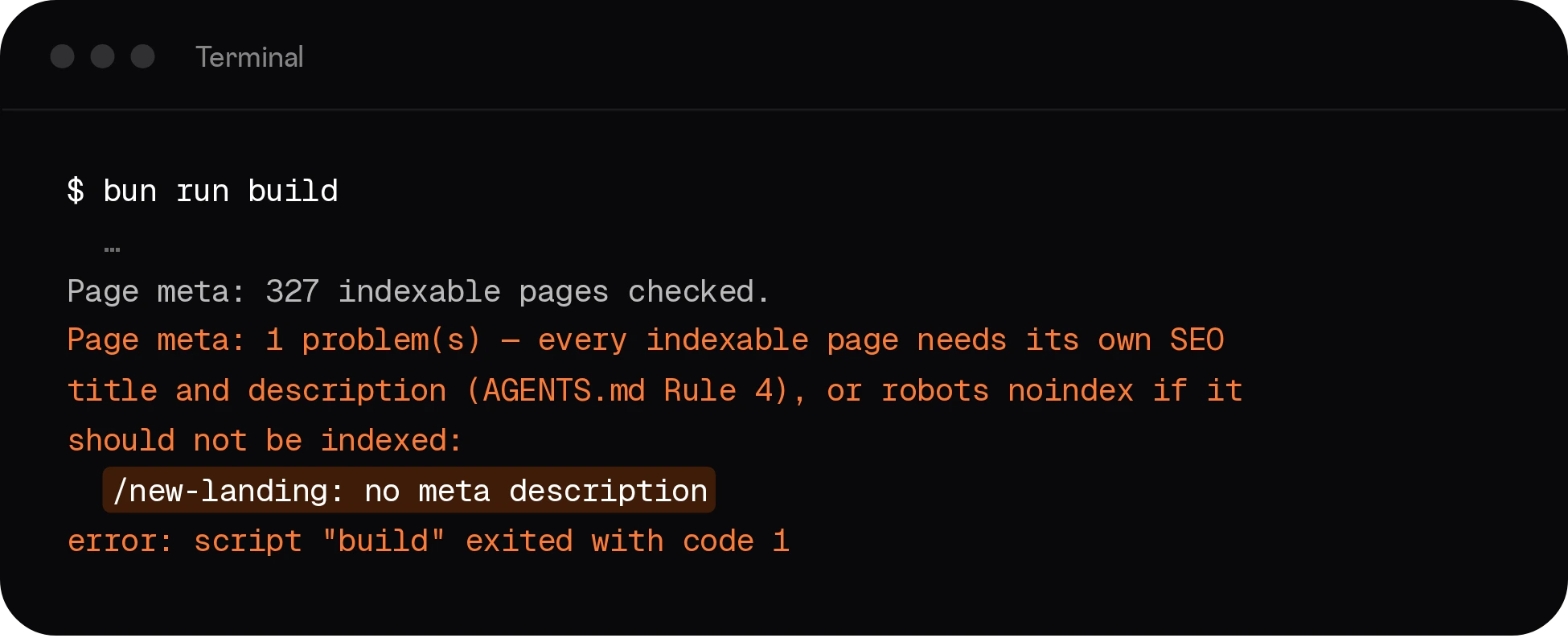
The rule: every page that search engines can index needs its own title and meta description. The build checks this and fails if a page is missing either one or reuses the site default. It's not a guideline an agent can forget. The site simply won't build.
4. Deciding what Google sees
A static export happily lists every page it builds. That includes test routes, page variants and sections that aren't ready for the public.
The rule: blog posts go into the sitemap automatically. Every other page is added only after a person approves it, and the build log names each page it's holding back. Sections that aren't ready yet are closed to search bots, and the build fails if one of those pages loses its noindex tag.
5. The analytics scare
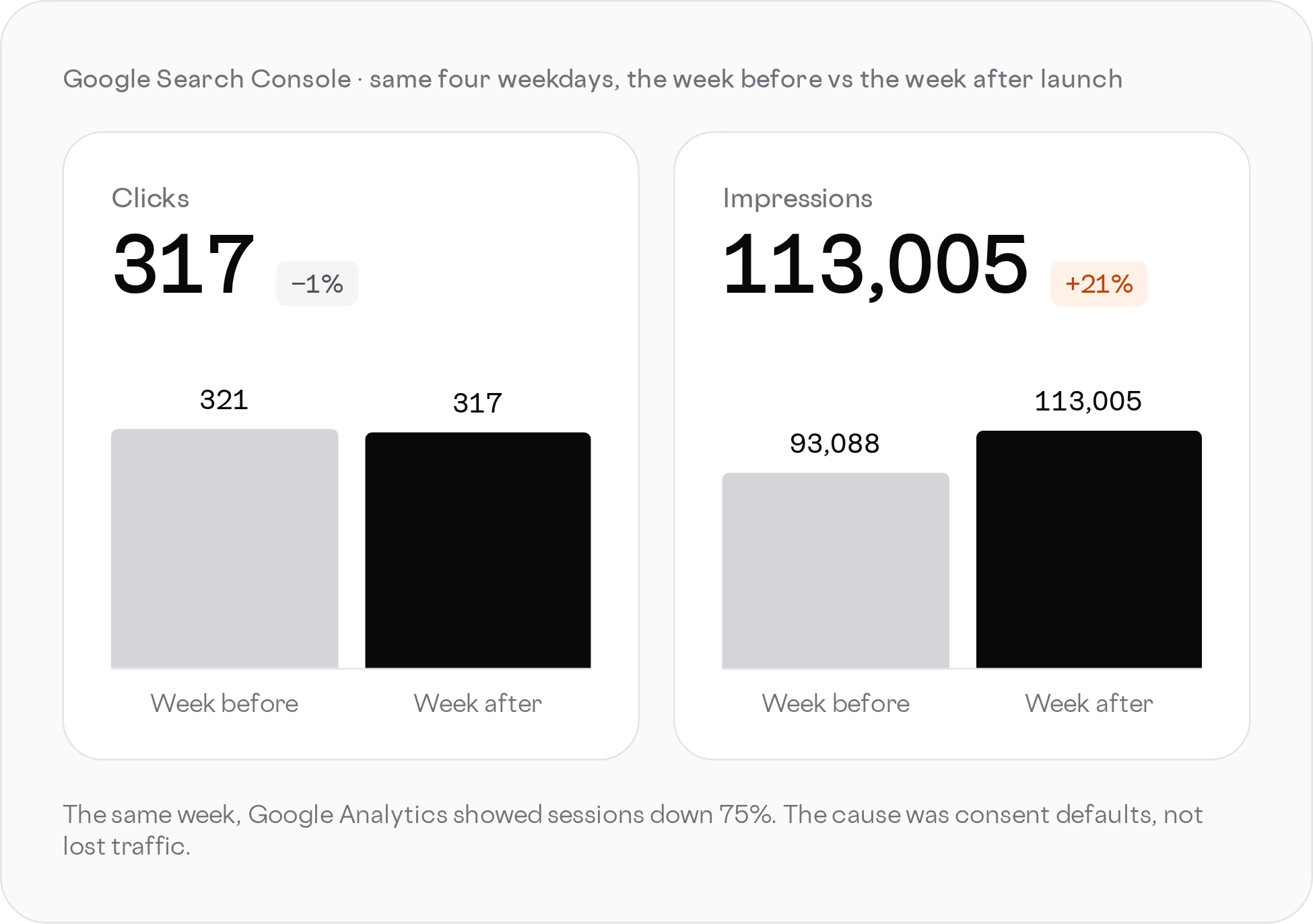
The week after launch, Google Analytics showed sessions down 75%. It looked like the migration had broken our traffic.
It hadn't. Search Console clicks for the same days were flat (321 before, 317 after, comparing the same weekdays). Impressions went up 21%, from 93,088 to 113,005. A site losing traffic doesn't gain impressions.
The real cause was the cookie consent setup. The new site denied analytics by default for every visitor, everywhere, until they clicked accept. Most people don't click, so most visits went uncounted.
The rule: consent defaults are regional. Strict where the law requires it, permissive where it doesn't. And before anyone panics over one dashboard, we check a second source.
Where we are now
- Clicks from Google held steady through the switch, and impressions grew.
- The sitemap lists 322 URLs, including 246 blog posts.
mainhas more than 80 commits, each one a change we can read, review and roll back.- Old Webflow URLs redirect to their new homes with a proper 301.
The bigger change is how the site feels to work on. A copy fix is a sentence in a chat. A new landing page is a branch, a preview link and a release command. Nobody waits for the one person who knows the Webflow project.
What we'd do differently
We'd split staging and production on day one, even while the old site is still live. It costs nothing, and it makes the habit of "publish means staging, release means production" part of the work from the start.
We'd also write the rules into the repository straight away, not after each mistake. Most of the rules in this post exist because something went wrong first. They could have been written on the first day.
And we'd treat "done" as a claim to check, not a fact, from the very first task.
Try it on your own site
We moved our own site with the product we build. If you're stuck on a website builder and want a team of agents and people working on your site, with real version control and a clean path to production, see how Awesomic works.
Take a deep breath… and Awesomic.





