




Webflow vs WordPress in 2026: Which One Saves You More Time?

Key takeaways:
- WordPress runs 41.2% of all websites and 59.1% of the CMS market as of August 2026. Webflow runs 0.8% and 1.2%. Ubiquity is WordPress's real advantage, and it is the reason its talent pool and plugin ecosystem are unmatched.
- Webflow's time saving is in maintenance you never do. WordPress's time saving is in problems somebody has already solved, so you do not have to build a solution.
- Live pricing changed recently: Webflow Basic is $15/month billed yearly and the CMS-capable plan is now Premium at $25/month, with a new Team tier at $2,500/month. The $18/$23/$39 tiers quoted across most comparisons are stale.
- "WordPress" means two different products. WordPress.org is the free self-hosted software behind that 41.2%; WordPress.com is Automattic's hosted service starting at $4/month. Comparisons that mix them are comparing nothing.
The honest version of this comparison is that both platforms save you time, at different moments, and the moment that matters depends on who does the work.
Webflow saves the time you would have spent on updates, plugin conflicts, security patches, and the hosting stack. WordPress saves the time you would have spent building something that a plugin already does, out of the largest open-source plugin directory on the web.
If you pick based on which is "better," you will pick wrong about half the time. If you pick based on which kind of time your team actually loses, you will pick right almost always.
We're Awesomic, and we build on both, so this is not a pitch for one of them. We've watched a Webflow site ship in nine days and we've watched a WordPress build absorb three weeks of plugin debugging. We've also watched the reverse. What follows is the comparison with live numbers, checked in August 2026, because most of what is published about this pairing quotes pricing that no longer exists.
The short answer
If your team has no developer and your site is mostly marketing, Webflow will save you more time. Ask it the other way round, WordPress vs Webflow, and the answer flips as soon as your site depends on search traffic at volume, a custom content structure, ecommerce, or integrations with systems you do not control. The gap widens as the site grows.
That is the whole answer. Everything below is the evidence for it and the edge cases where it flips.
What Webflow is
Webflow is a visual development platform: you build in a canvas that maps directly onto HTML and CSS, and it hosts the result. There is no separate hosting account, no plugin updates, and no database to maintain.
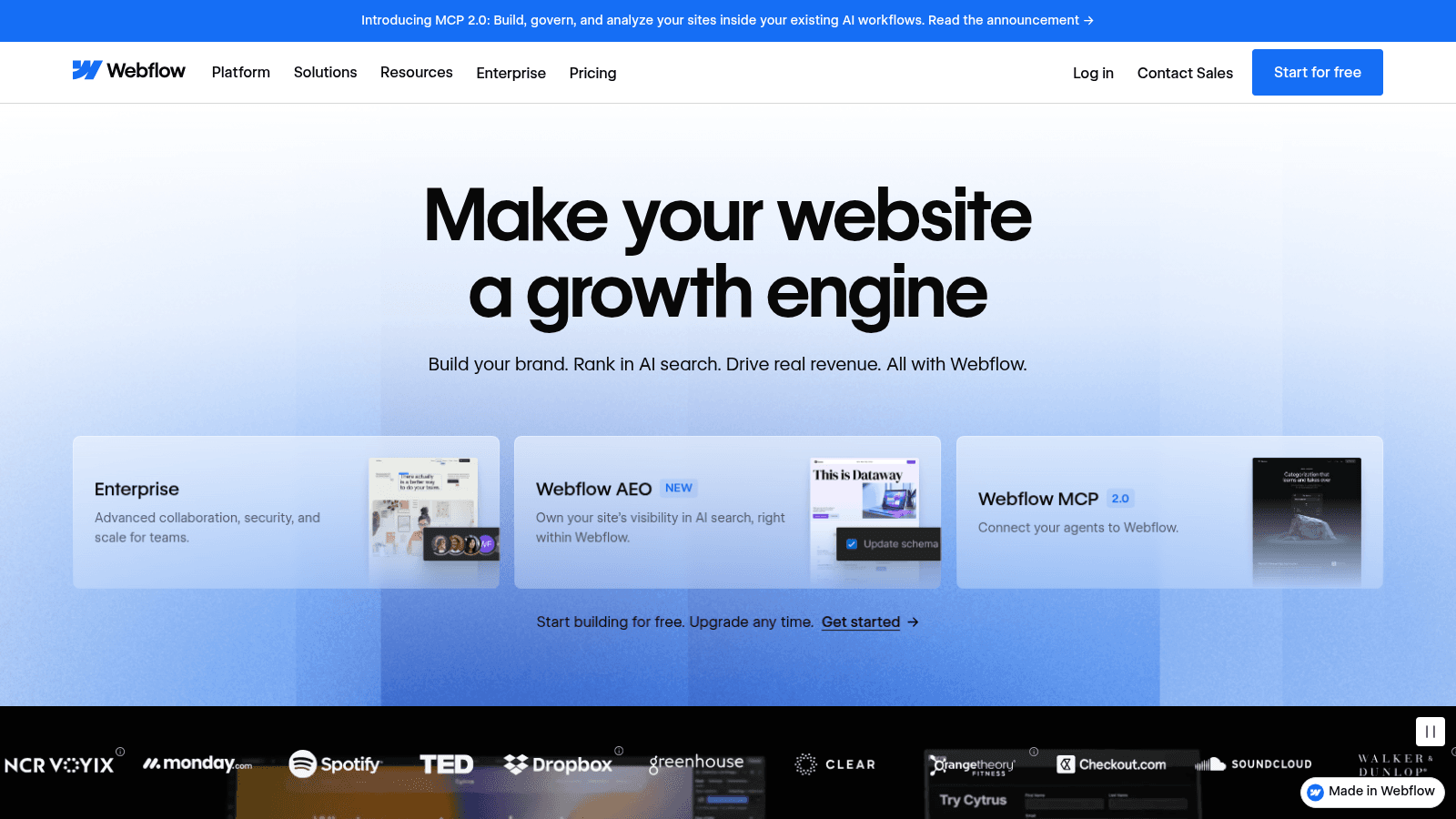
Webflow's homepage, webflow.com (August 2026).
The current positioning is worth noticing. The hero reads "Make your website a growth engine," the subhead promises brand building, ranking in AI search, and revenue, and the three cards below it push Enterprise, Webflow AEO, and a Webflow MCP server at version 2.0. Logos across the bottom include Spotify, Dropbox, TED, monday.com, Greenhouse, and SoundCloud.
Two things follow from that. Webflow has moved firmly upmarket, and it is betting on AI search visibility as a differentiator rather than on being an easier website builder. For a marketing team, that means the product roadmap is pointed at your problems. For a developer, it means the platform is becoming more opinionated, not less.
What WordPress is, and which WordPress you mean
Naming which WordPress you mean is the distinction that ruins most comparisons. WordPress.org is free, open-source software you install on hosting you choose. WordPress.com is a commercial hosted service run by Automattic with its own pricing tiers. They share a name and a code lineage and almost nothing else commercially.
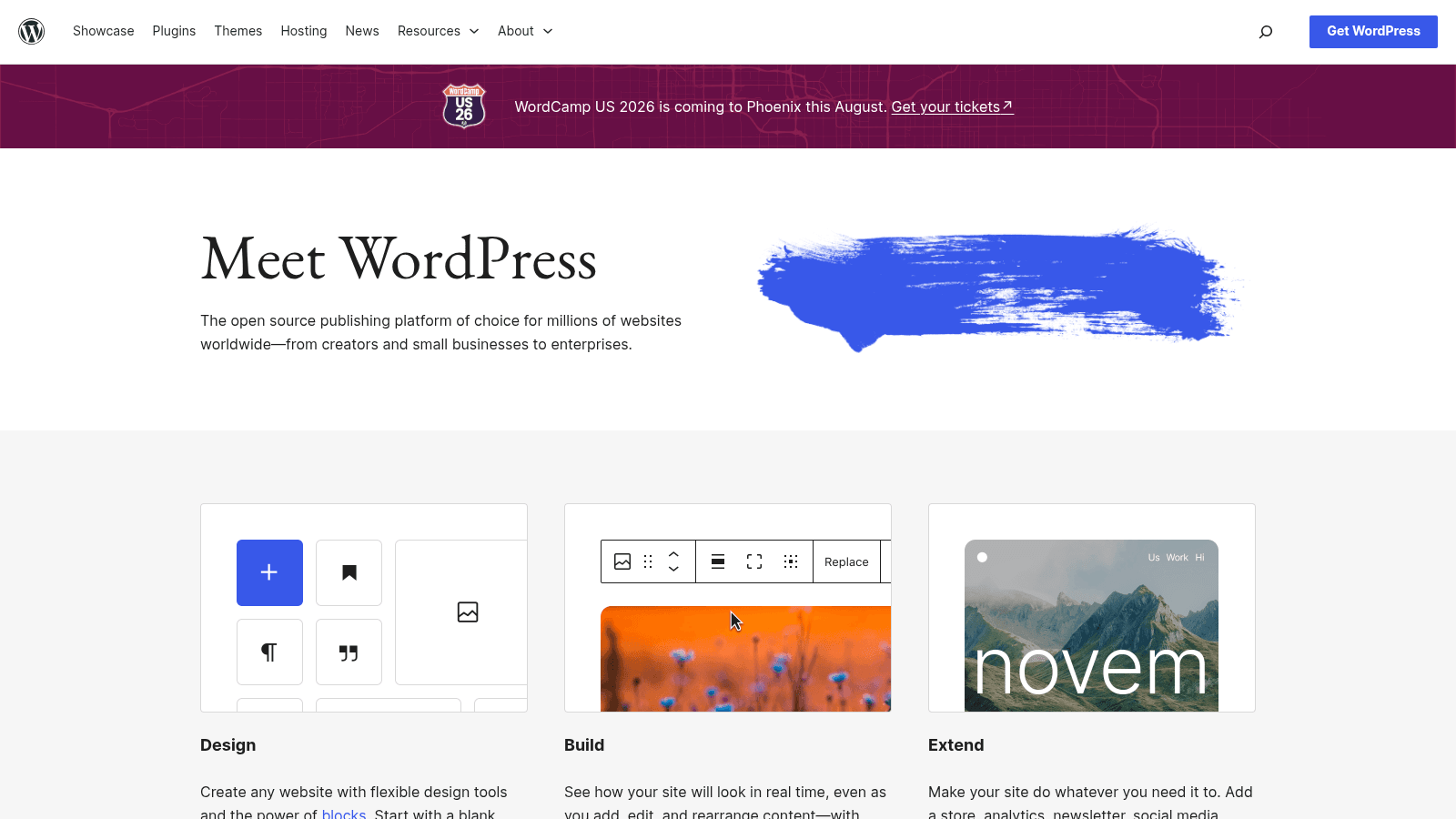
WordPress.org's homepage, wordpress.org (August 2026).
The wordpress.org homepage says exactly what the project is: "The open source publishing platform of choice for millions of websites worldwide, from creators and small businesses to enterprises." Three cards below it cover Design, Build, and Extend, and the top-right button is "Get WordPress," a download rather than a signup.
That download is the whole difference. With self-hosted WordPress you own the files, the database, and the responsibility. Nobody can change your pricing, deprecate your editor, or make your editors into paid seats, and nobody will patch your site for you either.
When a statistic says WordPress powers a certain share of the web, it means this one. When a comparison shows WordPress plans starting at $4 a month, it means the other one.
Webflow vs WordPress pricing
Pricing is where the stale numbers do the most damage, so both of these are captured from the live pages in August 2026.
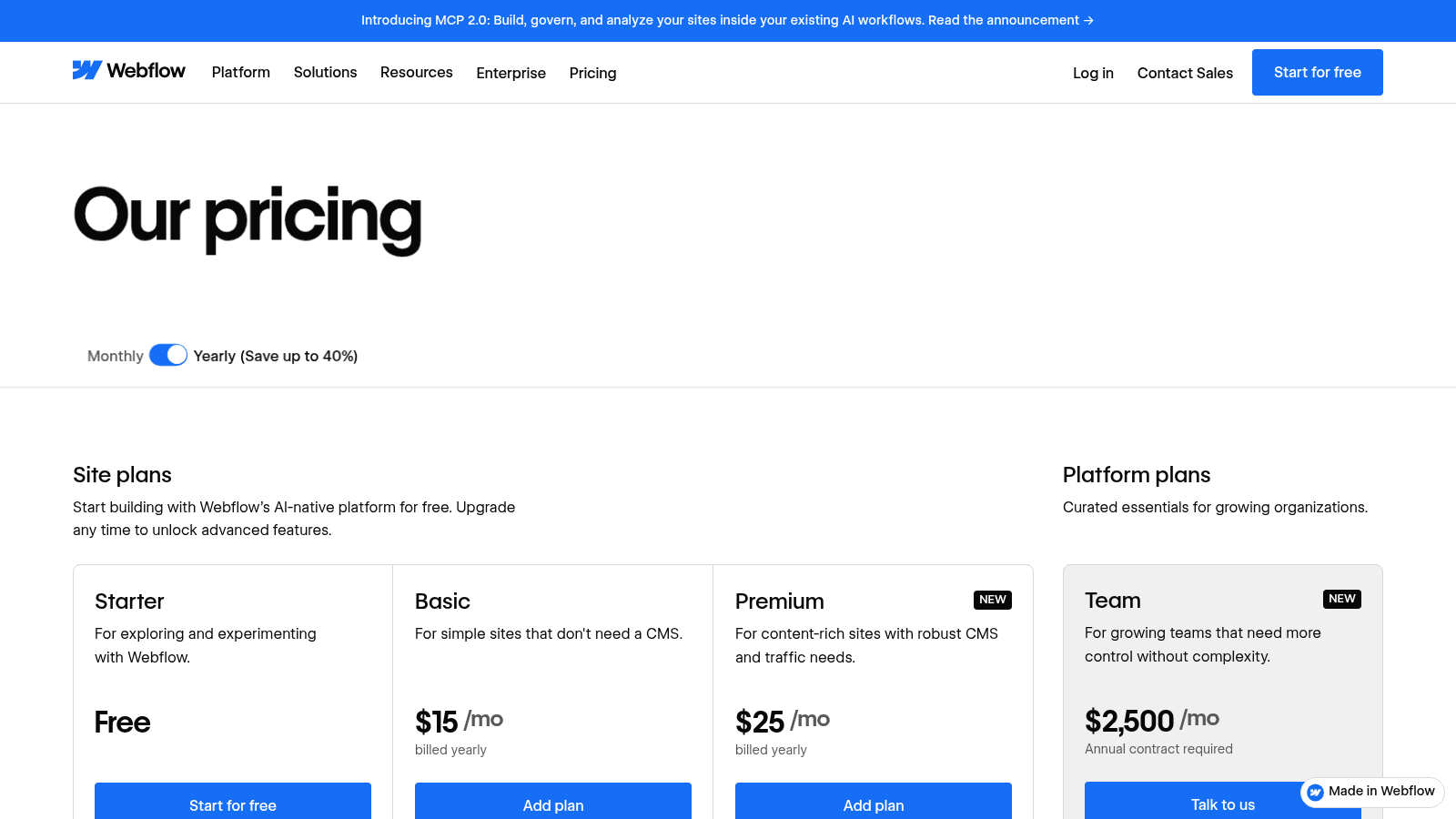
Webflow's pricing page with the yearly toggle active, webflow.com/pricing (August 2026).
Webflow's site plans are Starter (free), Basic at $15/month billed yearly for sites that do not need a CMS, and Premium at $25/month billed yearly for content-rich sites with CMS and traffic needs. Above those sit platform plans: Team at $2,500/month with an annual contract required, and Enterprise on custom pricing. The Basic and Premium tiers carry a "Save up to 40%" yearly discount, so monthly billing costs more.
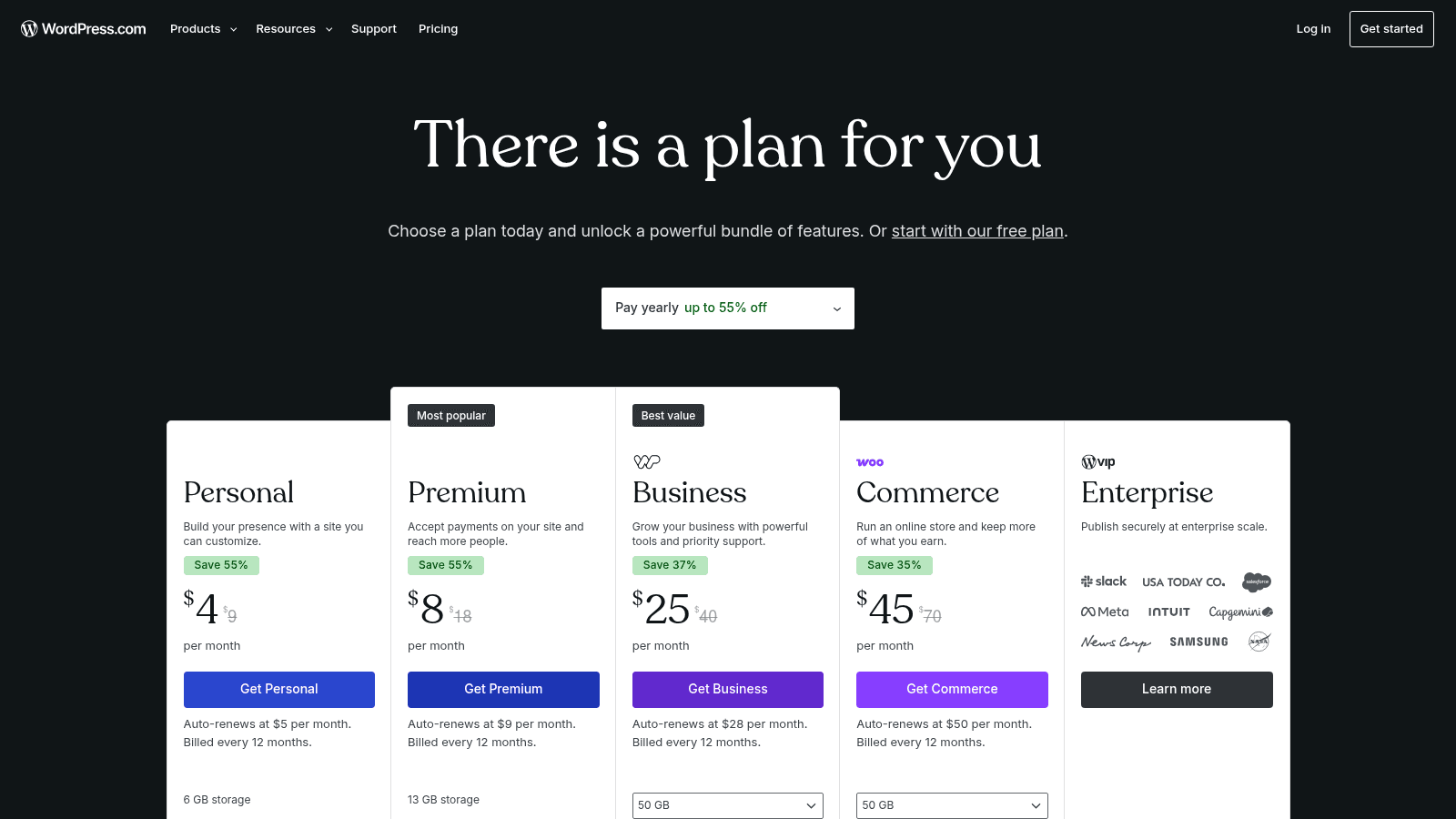
WordPress.com's pricing page, wordpress.com/pricing (August 2026). Self-hosted WordPress.org is free and priced separately through your host.
WordPress.com's plans, paid yearly, run Personal at $4/month with 6 GB storage, Premium at $8/month with 13 GB, Business at $25/month with 50 GB, and Commerce at $45/month. Each shows a renewal price a dollar or two higher than the promotional first-year rate, and Enterprise routes to WordPress VIP.
Self-hosted WordPress is the third column, and it is the one most businesses actually run. Here is what each route really costs for a marketing site of moderate size.
| Route | Software | Hosting | Typical add-ons | Realistic year one |
|---|---|---|---|---|
| Webflow Premium | Included | Included | Apps, extra seats | $300 plus workspace seats |
| WordPress.com Business | Included | Included | Some plugins allowed | $300 to $500 |
| Self-hosted, budget host | Free | $60 to $200/year | Theme, SEO, forms, backups | $250 to $700 |
| Self-hosted, managed host | Free | $350/year and up | Theme, SEO, forms, security | $600 to $1,500 |
| Webflow Team | Included | Included | Localization, seats | $30,000 plus |
For concrete anchors on the self-hosted line: Kinsta's entry managed plan is $35/month, or $30/month billed annually at $350 a year for one WordPress install with 10 GB storage. Yoast SEO Premium is $118.80 a year excluding VAT. Neither is required, and both are typical.
The jump from Webflow's $25 plan to its $2,500 Team plan is the number that should shape an enterprise conversation, because there is nothing between them.

Webflow SEO vs WordPress
Webflow's SEO tooling works correctly out of the box: editable meta titles and descriptions, automatic sitemaps, clean semantic markup, 301 redirect management, and no plugin required to get any of it. Nothing is broken by default, which is more than can be said for a fresh WordPress install with the wrong theme.
WordPress wins anyway once volume enters the picture, for two reasons that have nothing to do with the platform being smarter. It has purpose-built tooling for content at scale, from taxonomies and custom post types to editorial workflow plugins. And its ecosystem has solved every structured-data, internal-linking, and programmatic-page problem that a large content operation eventually hits.
Performance is the honest counterweight, and here WordPress's ubiquity works against it. The HTTP Archive's Web Almanac found that WordPress origins passed all three Core Web Vitals on mobile just 40% of the time, against a 51% pass rate across all origins, and behind Duda at 73%, Squarespace at 60%, Wix at 57%, and Drupal at 56%.
That gap is largely a hosting and plugin story rather than a core-software story. It is still the average outcome for real WordPress sites, though, and your site starts at the average until you spend money moving it.
For a webflow seo vs wordpress decision, the split is clean. Under roughly 100 pages with a marketing-led team, Webflow is faster to get right and stays right. Above a few hundred pages with a content team publishing weekly, WordPress gives you the controls you will eventually need, provided you pay for hosting that does not undo them.
Where the hours actually go
Time is the question in the title, so it deserves its own accounting. The hours do not disappear on either platform; they move.
| Task | Webflow | Self-hosted WordPress |
|---|---|---|
| Initial build, marketing site | 1 to 3 weeks, no dev needed | 2 to 6 weeks, dev usually needed |
| Publishing a new landing page | Minutes, by a marketer | Minutes to hours, theme dependent |
| Platform and plugin updates | None, handled by Webflow | 1 to 4 hours a month, ongoing |
| Security and backups | Included | Host plan or plugin, plus monitoring |
| Adding an unusual feature | Custom code or an app, sometimes not possible | Almost always a plugin exists |
| Migrating away later | Export is limited | Full database and file export |
Read the last two rows together, because they are the real trade. Webflow removes recurring maintenance and adds a ceiling. WordPress removes the ceiling and adds recurring maintenance. Neither is free.
The maintenance line is the one teams underestimate. One to four hours a month sounds trivial until it lands on the person who is also running your campaigns, and until the month a plugin update breaks the contact form the week of a launch.
Flexibility comparison
Webflow's flexibility is real inside its own model. You get genuine control of layout, typography, and interactions, and the visual canvas produces real HTML and CSS rather than an abstraction layer. What you do not get is arbitrary server-side logic, and the CMS has hard structural limits you cannot argue with.
WordPress's flexibility is close to unbounded because you can write PHP and touch the database. That is also its risk profile: unbounded flexibility means unbounded ways to build something fragile, and most of the worst WordPress sites are the ones where somebody used all of it.
The practical webflow vs wordpress flexibility comparison comes down to three questions. Does your site need logic that runs on a server you control? Does your content have relationships more complicated than posts, categories, and a few reference fields? Will you need to integrate with a system that has a WordPress plugin and no Webflow app? Any yes points at WordPress. Three noes point at Webflow, and you will move faster there.
Webflow vs WordPress for agencies
Agencies have a consideration nobody else does: the platform choice changes their revenue model, not just their build time.
On Reddit, in a thread asking WordPress users who moved to Webflow how it was going, one agency owner put it plainly. The cost of Webflow is roughly what they charge clients for hosting, and they earn about £5,000 a year from that line, so moving clients across would erase it.
Another commenter offered the cleanest heuristic on the page: content sites go to WordPress, marketing sites go to Webflow. Both are anecdotal, but they name the two things agencies weigh in practice.
That thread surfaced a second consideration too, which is platform risk. One reply cited a Webflow pricing change making editors into paid seats as the kind of shift a client cannot opt out of without a rebuild. With self-hosted WordPress, you can change host, theme, or plugin vendor independently, and that optionality is worth something to anyone signing multi-year client relationships.
The counterweight is throughput. A Webflow agency that has standardized its components can ship a marketing site substantially faster than a WordPress shop rebuilding a theme, and faster delivery at a fixed price is margin.
Webflow vs WordPress for enterprises and B2B SaaS
For enterprises, the decision usually gets made by procurement and security rather than by the marketing team. Webflow's own plan comparison answers that at the Enterprise tier with granular permissions, custom roles, advanced governance, secure integrations, stronger SLAs, and a dedicated account manager. Webflow has clearly built toward it, and the Team tier at $2,500/month is the entry point to that world.
WordPress answers it differently, through hosting. WordPress VIP and the managed enterprise hosts provide the compliance posture, and the software stays yours. The trade is that you are assembling the enterprise guarantees from vendors rather than buying them in one contract.
For webflow vs wordpress b2b saas specifically, the pattern we see most often is a split stack. Marketing site on Webflow, because the team ships pages weekly without filing tickets. Docs, changelog, and a high-volume blog on something else, frequently WordPress, because those need structure and scale that a marketing site does not. Running both is more common than either camp admits, and it is usually the right answer for a company past Series A.
The one enterprise case where Webflow is clearly wrong is a site that must run inside your own infrastructure for regulatory reasons. The one where WordPress is clearly wrong is a brand team with no engineering support and a mandate to ship a new campaign page every week.
How to choose without a two-week evaluation
Answer four questions honestly and the choice usually makes itself.
- Who edits the site week to week, a marketer or a developer? A marketer working alone points at Webflow.
- How many pages will exist in two years? Past a few hundred, WordPress's content tooling starts earning its maintenance cost.
- Is organic search a primary growth channel or a secondary one? Primary favors WordPress, especially with a publishing team.
- Do you need something on the site that only exists as a plugin? That is a decision, not a preference.
If the answers split, take the route your team can maintain without heroics. A well-run WordPress site beats a Webflow site nobody updates, and a clean Webflow site beats a WordPress install with 34 plugins and no owner.
For a longer-range view that includes a third option, our Webflow, WordPress and Framer breakdown compares all three on budget, and the templates versus custom design question is worth settling before you pick a platform at all, since it changes the cost more than the platform does.
Where to start
Pick the platform your weekly editor can actually operate, then design for it rather than around it. The most expensive websites we see are the ones built on the right platform by someone who did not know it well.
If you already know which one you want and the gap is design and build capacity, that is the part we do. Awesomic matches you with a vetted designer in up to 24 hours on a flat monthly fee with unlimited revisions, and we build on Webflow and WordPress both.
The practical benefit is that the platform decision stays yours rather than being made by whoever you hired. For teams weighing a redesign or comparing this against unlimited web development, Book demo and we'll scope it against your actual page volume.
One last piece of context on scale. W3Techs data from August 2026 puts WordPress at 41.2% of all websites and 59.1% of the CMS market, with Webflow at 0.8% and 1.2%.
That does not make WordPress the better tool for you. It does mean that when something breaks at 2am, the answer is more likely to already exist in a forum post, and that is a form of time saving too.
Whichever you pick, a new market or a new segment usually means a wave of new pages, which is worth thinking through alongside your market development strategy and the product design techniques your team already uses.
Frequently asked questions
Is Webflow better than WordPress for SEO?
Neither is better in the abstract, but they are good at different scales. Webflow gets the technical basics right with no configuration: meta editing, automatic sitemaps, redirects, and clean markup.
WordPress gives you deeper control over content structure and a much larger ecosystem for programmatic and structured-data work, which matters once you are past a few hundred pages. Performance data cuts the other way, with WordPress origins passing Core Web Vitals on mobile at 40% against a 51% average across all origins.
How much does Webflow cost compared to WordPress?
Webflow site plans are $15/month for Basic and $25/month for Premium, both billed yearly, with a free Starter tier and a Team plan at $2,500/month.
WordPress core software is free; you pay for hosting, which runs from about $60 a year on budget shared hosting to $350 a year for a managed plan like Kinsta's entry tier, plus optional premium plugins such as Yoast SEO Premium at $118.80 a year. WordPress.com, the hosted service, starts at $4/month. For a small marketing site the two land within a few hundred dollars of each other.
Can you migrate from WordPress to Webflow?
Yes, and Webflow publishes a migration guide for it, but plan for a rebuild rather than a transfer. Content moves reasonably well through CSV import into Webflow's CMS; templates, plugins, and any custom functionality do not move at all and have to be re-created. Migrating in the other direction is easier, since WordPress can import most content formats and you own the destination. Treat the direction you may want to reverse later as part of the decision.
Which is better for agencies managing many client sites?
It depends on what you sell. Webflow's fixed monthly cost per site is close to what many agencies charge clients for hosting, so moving a book of clients across can erase a recurring revenue line, a point agency owners raise often.
WordPress keeps that line and keeps your ability to change host or vendor independently. Webflow wins on build throughput for marketing sites, which is its own margin. A webflow vs wordpress for agencies comparison is really a question about whether your business bills for builds or for retainers.
Do enterprises actually use Webflow?
Yes, and Webflow markets to them directly, with Enterprise plans covering granular permissions, custom roles, governance, publishing workflows, and dedicated support. Its own homepage carries logos including Spotify, Dropbox, monday.com, and Greenhouse. The practical limit for webflow vs wordpress for enterprises is infrastructure control: if regulation requires the site to run inside your own environment, self-hosted WordPress on enterprise hosting is the option that can satisfy it, and Webflow is not.
One subscription and your hiring problems solved


FAQ


Awesomic is a revolutionary app that matches companies with vetted professionals across 30+ skill sets, from design and development to marketing and product. Based in San Francisco with a global core team, we offer a faster and more flexible alternative to traditional hiring through a subscription-based model. Awesomic delivers high-quality talent on demand, without the delays of recruiting.
We function as a subscription-based service that matches you to top-tier, vetted talent. Submit a project in just a few clicks and start receiving deliverables in as little as 24 hours. Scale your Awesomic plan up or down as your business needs change.
Every Awesomic subscription comes with unlimited revisions. You receive daily progress updates via the app, and you can provide feedback or request iterations as needed. If your project requires a different approach, you can request a talent rematch at any time, at no extra cost. You can also add teammates to collaborate and streamline feedback
A talent marketplace is a platform that utilizes data and intelligent matching algorithms to connect professionals with projects based on their skills, experience, and availability. While often used internally by large companies, Awesomic applies this model at scale, matching vetted global talent to your most critical business needs.
Hiring is time-consuming, expensive, and risky. Awesomic eliminates that problem. We rigorously vet all talent for technical ability, communication, and soft skills, ensuring only senior-level professionals work on your projects. You skip the job posts, interviews, and delays, and get straight to results.
No, Awesomic goes beyond design. While many clients utilize us for branding, UI/UX design, or motion graphics, we also provide vetted talent in no-code web development, product design, marketing, and more. Think of us as an extension of your team. A flexible, high-performing creative partner from planning to execution, whether you're building awesome products or scaling your team.
You can talk directly with your matched talent via the Awesomic app, connect via Slack, email, or schedule video calls. No matter the plan, you’ll receive daily updates in the app for every active task. You can also tag us in for any issues through our in-app customer chat.


