




Canva vs Figma: Which One Fits You?

Key takeaways:
- Pick Figma when the design has to become code or a shared design system: a Professional Full seat, with Figma Make, Dev Mode and Figma Sites included, costs $16 a month on annual billing or $20 month to month.
- Pick Canva when many non-designers make marketing, social and print work under brand rules: a shared team needs Business at $250 a year per person, where approvals start, while Pro ($144 a year, or $18 month to month) covers one person only.
- The tools now overlap: Figma Buzz and Figma Slides come with a $3 Collab seat (billed annually), and Canva Code publishes an interactive page as a live website in one click.
- In our example, one designer and four marketers pay $1,250 a year on Canva Business or $336 on Figma Professional billed annually, but those four Collab seats can't edit in Figma Design and can only try Figma Make in private drafts.
Canva and Figma both run in a browser, both let a team edit one design together, and both now sell AI that drafts a first version for you. What separates them is what the finished work has to become, and who's making it.
Every price and feature in this Canva vs Figma comparison comes from the two vendors' own sites, checked in September 2026.
The short answer
Choose Figma if what you design will become a product. App screens, a web app and a design system that developers build from belong there, because one Full seat bundles Figma Design, Dev Mode for developer handoff and Figma Make for code-backed prototypes.
Choose Canva if the work is marketing and several people make it. Social posts, ads, print pieces and sales decks come together quickly from templates, and Canva Business adds approvals so a brand lead signs off before anything goes out.
The Figma vs Canva line has blurred at the edges, with Figma selling Buzz for marketing assets and Canva Code putting interactive pages on the web. Figma Buzz and Figma Sites are still in beta, though, so the core split holds. You may want both, with designers in Figma and marketing in Canva, and we price that split below.
What Canva and Figma are in 2026
Both vendors have added products quickly, so start with how each describes itself today.
Canva, the template-first design suite
Canva's homepage asks "What will you design today?" and offers "AI-powered social posts, videos, presentations, and more." It's a design suite for people who make visual content without formal design training.
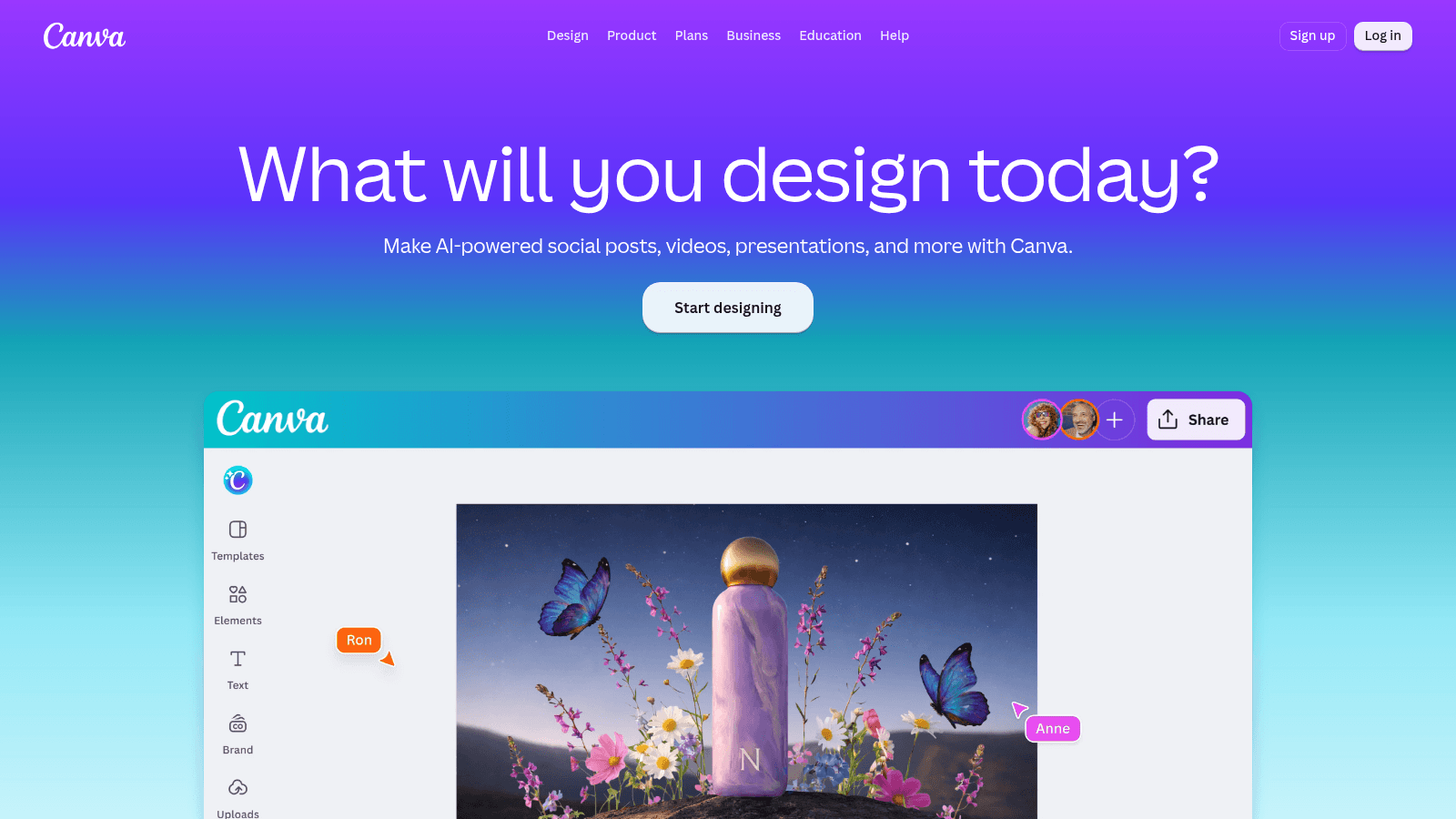
Canva's Design menu lists Docs, Sheets, Whiteboards, Presentations, Social, Videos, Print, Websites and a PDF Editor, and a Canva AI group in its Product menu lists tools such as Canva Code, Magic Resize, Magic Animate and Magic Write.
Canva also made Affinity "completely free" in late 2025, and its newsroom post describes the result as "vector, photo and layout tools in one place." Affinity's AI tools need a paid Canva plan.
A Brand Kit stores your logo, colors and fonts, and one click applies the kit's colors and fonts to a set of Magic Design results. That brand step is why Canva made our list of branding tools for startups.
Figma, the product design canvas
Figma's homepage calls it "The intelligent canvas for infinite creativity." At its core is a canvas for designing interfaces, with a growing set of products around it.
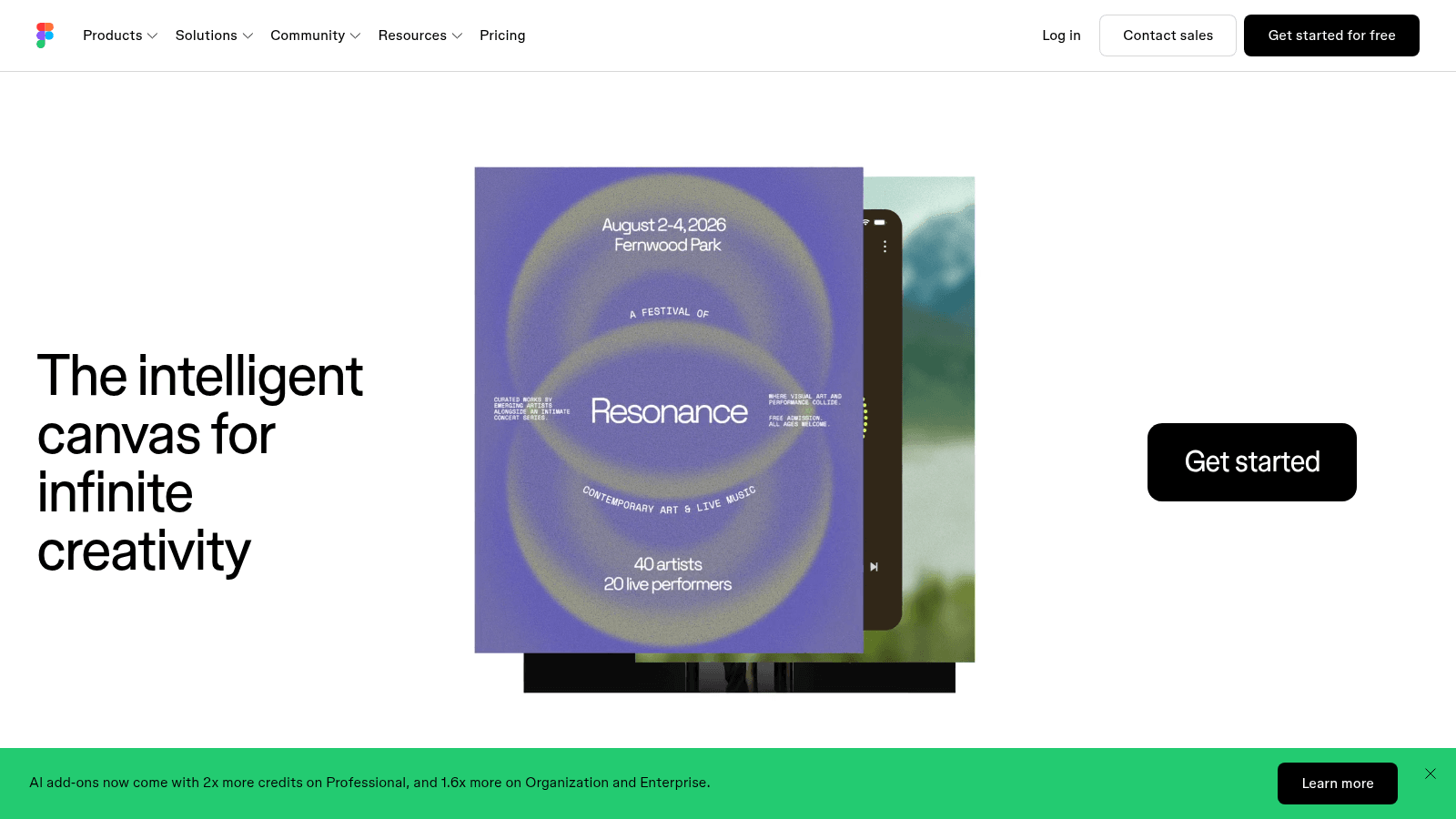
The pricing page lists nine products: Figma Design, Figma Make ("prompt to code"), Figma Draw, Dev Mode, FigJam and Figma Slides, plus the new Figma Motion, Figma Sites and Figma Buzz (all three still in beta). The product menu adds a tenth, Figma Weave, for "AI workflows for imagery, video, audio, and more."
The free Starter plan offers "free limited access": unlimited drafts, 3 shared Figma Design files (plus 3 FigJam and 3 Slides files), and 150 AI credits a day, up to 500 a month. Paid plans sell seats, and each seat type decides which products its holder gets.
Figma vs Canva differences at a glance
This Figma vs Canva comparison lines the two up on eight rows. The first row is our own one-line summary, and the rest come from each vendor's pricing and product pages.
| Feature | Canva | Figma |
|---|---|---|
| Built for | Marketing, social, print, video and decks | Product UI, prototypes and design systems |
| Cheapest plan for one designer | Pro: $144 a year, or $18 month to month | Professional Full seat: $192 a year on annual billing, or $20 month to month |
| Free plan | 1 Brand Kit (3 colors), 5GB, up to 20 Standard or Premium AI uses | Unlimited drafts, 3 shared Figma Design files, up to 500 AI credits a month |
| Brand controls | 5 Brand Kits on Pro; 100 with approvals on Business | Figma Buzz (beta) brand templates, five per team on Professional |
| AI allowance | 10x Free's on Pro, 20x on Business | 3,000 credits a month on a Professional Full seat; 500 on Dev and Collab seats |
| Developer handoff | No handoff mode like Dev Mode on its plan pages | Dev Mode, on Full and Dev seats |
| Websites | Canva Websites and Canva Code | Figma Sites (beta) and Figma Make |
| Vector illustration | Affinity, free since late 2025 | Figma Draw: free on Starter (3 shared design files plus drafts), a Full seat on paid plans |
Most rows point the same way: Figma serves a product team and the developers who build from its files, and Canva serves a marketing team and its brand lead. Brand assets and websites are where that split breaks, as the overlap section shows.
Ease of use: the first hour vs the tenth month
A Figma vs Canva ease of use comparison usually ends at "Canva is easier." That's true for the first hour and far less clear by the tenth month.
Researchers don't agree on what "easy to learn" means either. A CHI 2009 survey of software learnability by Grossman, Fitzmaurice and Attar starts from exactly that: "It is well-accepted that learnability is an important aspect of usability, yet there is little agreement as to how learnability should be defined, measured, and evaluated."
So pick your measure first: minutes to a first usable file, or speed after months of daily use.
Canva is built to win the first hour. You pick a template or type a prompt into Magic Design, then swap words and photos in a drag-and-drop editor. The templates make layout calls for you, so spacing, contrast and hierarchy come out mostly right before you've learned the principles of design.
Figma asks more up front. A new file opens on an empty canvas, and speed comes from concepts you pick up over weeks. Coming from Canva, learn them in this order:
- Frames, the containers that hold each screen, post or slide.
- Components, so a button or logo you edit once updates everywhere it's used.
- Libraries, which share those components with your team.
- Variables, which store colors and spacing as named values, with modes such as light and dark.
- Prototyping, which links frames into a clickable flow.
When one button edit reaches dozens of screens built from shared components, Figma's slow start pays back.
Whether it's worth it depends on your hours in the tool. In a Reddit thread asking why marketers would use Canva instead of Figma, one commenter said marketers "don't want to spend numerous hours on learning a tool they'll end up using only a few hours in their life time." That's one person's view, and it fits anyone who designs a few hours a month.

Canva vs Figma collaborative design workflows
Both tools let several people edit one design at once: Canva's pricing page lists real-time collaboration and comments, and the editor on its homepage shows two named cursors on a single design. What differs is how much each person's work depends on everyone else's.
In Distance Matters, a 2000 paper in the journal Human-Computer Interaction, G.M. Olson and J.S. Olson study the conditions that effective distance work requires and sum up the results in four key concepts: "common ground, coupling of work, collaboration readiness, and collaboration technology readiness." The first two map neatly onto design tools.
Product design is tightly coupled. When a designer changes a button component, the developer's build and the product manager's flow have to change with it. Figma keeps that work in one live file, where viewers on paid plans comment for free, developers inspect it in Dev Mode, and Organization and Enterprise add branching and merging for trying changes away from the main file.
Tight coupling needs common ground, since everyone in the file has to know Figma. Another commenter in the same Reddit discussion wrote: "Collaboration in it can also be a pain if folks don't know it well." It's a single anecdote, and it names the common-ground cost exactly.
Marketing production is loosely coupled. A regional marketer fills in a master template, a brand lead approves it, and neither needs to know how the template was built. Canva Business is built for that shape of work, with "Collaboration and team admin tools" and "100 Brand Kits and approvals," and Enterprise adds tiered approvals, multi-team management, and SSO and SCIM provisioning.
How to set up Canva for a team of non-designers
One designer or brand lead builds this setup once, and everyone else works inside it.
- Put your logo, colors and fonts into a Brand Kit (Free allows 1 kit with 3 colors, Pro allows 5 kits).
- Build one master template per weekly format, such as a LinkedIn post, an Instagram story and a one-page PDF.
- Note on each template which parts people may change, such as the headline, photo and date.
- On Business, switch on approvals so the brand lead signs off before anything is published.
- Ask the team to start every design from a template, never a blank page.
- After a month, retire the templates nobody used.
If no one on the team can spare the time to build that kit and those templates, a Canva designer can set them up once for everyone else to fill in.
Figma Make vs Canva Magic Design and Canva Code
Both vendors sell AI that turns a prompt into a first draft, but the drafts are different objects. Figma describes Make as "prompt to code," and it returns software you can click through. Magic Design returns layouts drawn from Canva's template library, so Canva Code, which builds interactive pages, is the closer match to Make.
Here's Figma Make vs Canva Magic Design, with Canva Code added, as each vendor's product page describes them.
| Compare | Figma Make | Canva Magic Design | Canva Code |
|---|---|---|---|
| What you give it | A prompt plus Figma frames, images, PDFs, video, audio or text files | A text prompt or a photo | A description, or an uploaded HTML or code file |
| What you get back | An interactive, code-backed prototype or web app | A set of designs built from Canva's templates | An interactive page that responds to clicks, taps and scrolls |
| How you refine it | Prompts, canvas edits or code edits, with comments and version history | Edit your pick in Canva's editor, then apply your Brand Kit | Select an element and re-prompt, or edit text, fonts and colors |
| Where it ends up | A prototype or app you keep building; Make kits sync npm packages and library styles | A post, poster, deck, video or document you download or share | A live website, or an element inside a Canva design, with responses flowing into a Canva Sheet |
| What it draws on | The seat's monthly AI credits; sharing or publishing needs a Full seat | Limited uses on Free; included in Pro | Canva's shared monthly AI allowance; rolling out to paid plans first |
Make goes past a single prompt. Plan mode drafts an editable plan before generating, so you can fix the approach first, and MCP connectors pull in context from other tools. Make has no price of its own on Figma's pricing page: it runs on the seat's AI credits, 3,000 a month on a Professional Full seat, and Figma sells more credits as an add-on.
Magic Design has a narrower job. It currently works in English, covers formats such as Instagram stories, YouTube thumbnails, business cards and presentations, and its video mode turns three to ten of your photos or clips into a social video captioned from your prompt.
Neither feature removes the judgment in AI-assisted graphic design: someone still has to test Make's prototype against the real product and pick the Magic Design result that fits the brief.
Where Canva and Figma now overlap
Each vendor has moved onto the other's ground, so comparisons that treat them as separate categories are already dated. Four overlaps matter.
On-brand assets: Figma Buzz and Canva templates
Figma Buzz, still in beta, is built to "Produce on-brand assets at scale," which is Canva's core job. It ships with every paid seat type, including the Collab seat ($3 a month billed annually on Professional, $5 monthly), so a marketer doesn't need a Full seat. Canva's answer is its template library plus Brand Kits, with approvals on Business.
Decks: Figma Slides and Canva Presentations
Every paid Figma seat, Collab included, comes with Figma Slides, which suits a product team that wants its roadmap deck next to its design files. On Canva, Magic Design can draft a deck: enter a prompt in the editor's Design tab, preview the generated slides, then click Apply all pages.
Websites: Figma Sites, Canva Websites and Canva Code
Figma Sites, in beta, promises to "Publish fully responsive websites," and Figma Make can build a working web app. Canva has Websites in its main menu, and Canva Code pages go live on their own URL and adapt to desktop, tablet and mobile screens.
For a full site with many pages rather than one campaign page, weigh both against dedicated website design tools before you commit.
Vector art and motion: Figma Draw and Motion against Affinity
On a Full seat, Figma Draw adds vector illustration and the new Figma Motion, still in beta, lets you "Animate your designs." Canva's counter is Affinity, free since late 2025, plus Magic Animate. An illustrator who only needs vector tools can now get a full desktop suite from Canva at no cost; Figma's free Starter plan includes Draw too, but only within 3 shared design files plus drafts.
What the finished work has to become
Settle where the design is going before you open either tool, since every later step of the graphic design process, from sizing to the file you export, depends on it.
If it's going to code, Figma is built for that trip. A Dev seat, at $12 a month billed yearly on Professional, gives a developer Dev Mode for inspecting the design, and Make's output is code-backed from the start. Canva's plans list no developer handoff mode like Figma's Dev Mode.
If it's going to a feed, a printer or an inbox, Canva covers the route. Pro adds social scheduling, the main menu carries Print and a PDF Editor, and designs export as JPG, PNG, PDF or PPTX. Magic Resize then turns one approved design into other sizes.
Answer these four questions before you choose:
- Will a developer rebuild this in code, or will it ship as an image, PDF, video or deck?
- How many people will make new versions each month, and how many are designers?
- Does someone need to approve work before it's published?
- Who will still be editing this file a year from now?
If your answers lean toward code and designers, start in Figma. If they lean toward exports, approvals and non-designers, start in Canva.
Figma vs Canva pricing
Both tools start free and charge less on yearly terms, but they price different units: Canva charges per person on each plan, and Figma charges per seat, with each seat type including different products. Prices in any Canva vs Figma comparison go stale fast, so if one still mentions Canva Teams, it predates Business, the plan that replaced it.
Canva: Free, Pro, Business and Enterprise
Here's Canva's page with yearly billing selected, where the toggle promises savings "from 16%."
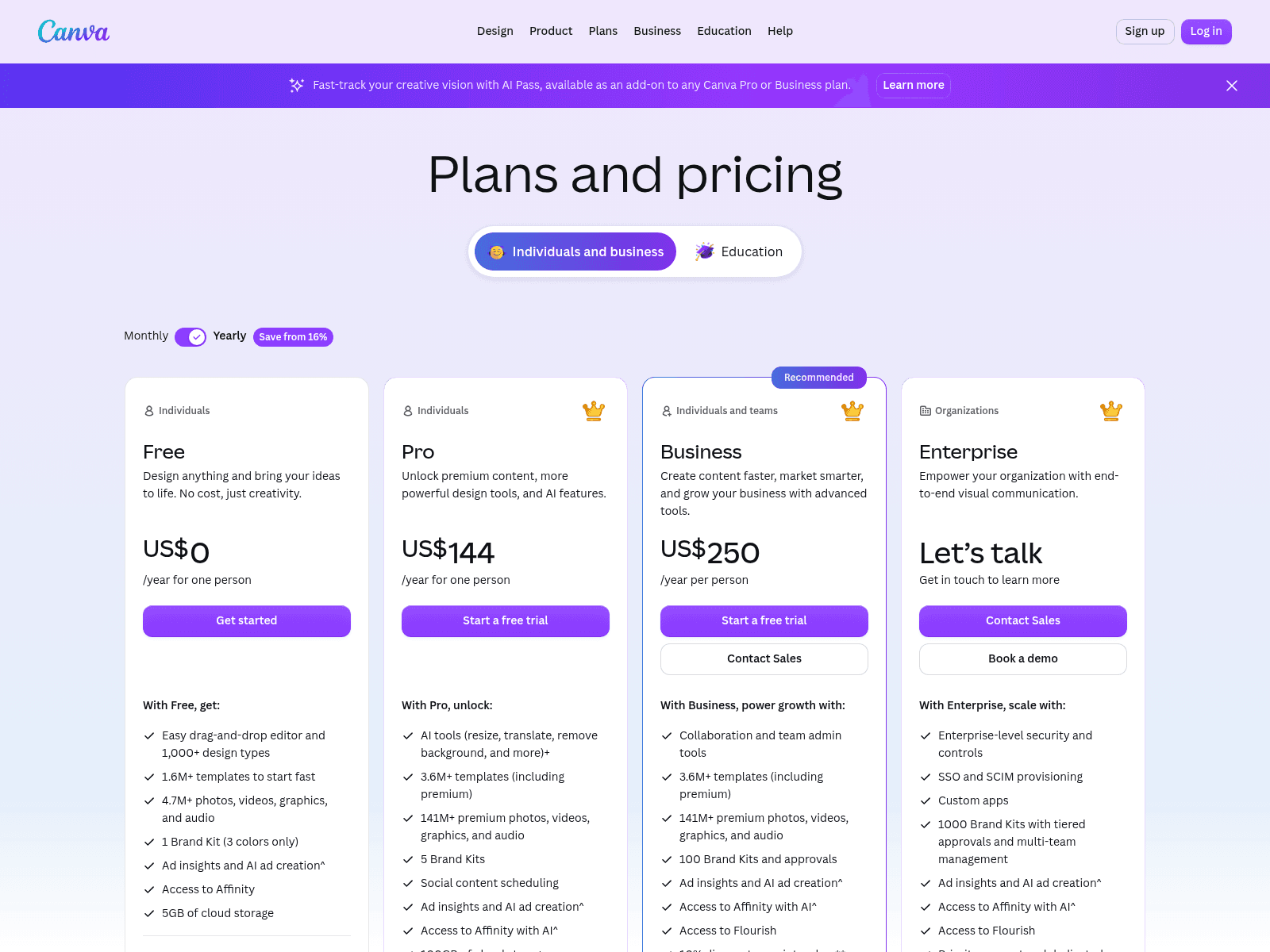
Pro costs $144 a year or $18 month to month "for one person," and Business, labeled Recommended, costs $250 a year or $25 month to month "per person." Enterprise shows no price, only "Let's talk." Pro and Business offer a free trial, though the page doesn't give its length, and the trial's AI allowance is the same as Free's.
Each step up buys more AI (10x Free's allowance on Pro, 20x on Business), more Brand Kits (1, 5, then 100) and more storage (5GB, 100GB, then 500GB), and team admin tools and approvals start on Business. AI Pass is sold as an add-on to Pro or Business.
Figma: seats priced by the job
Figma's page shows Professional on annual billing, and Organization and Enterprise have no toggle at all.
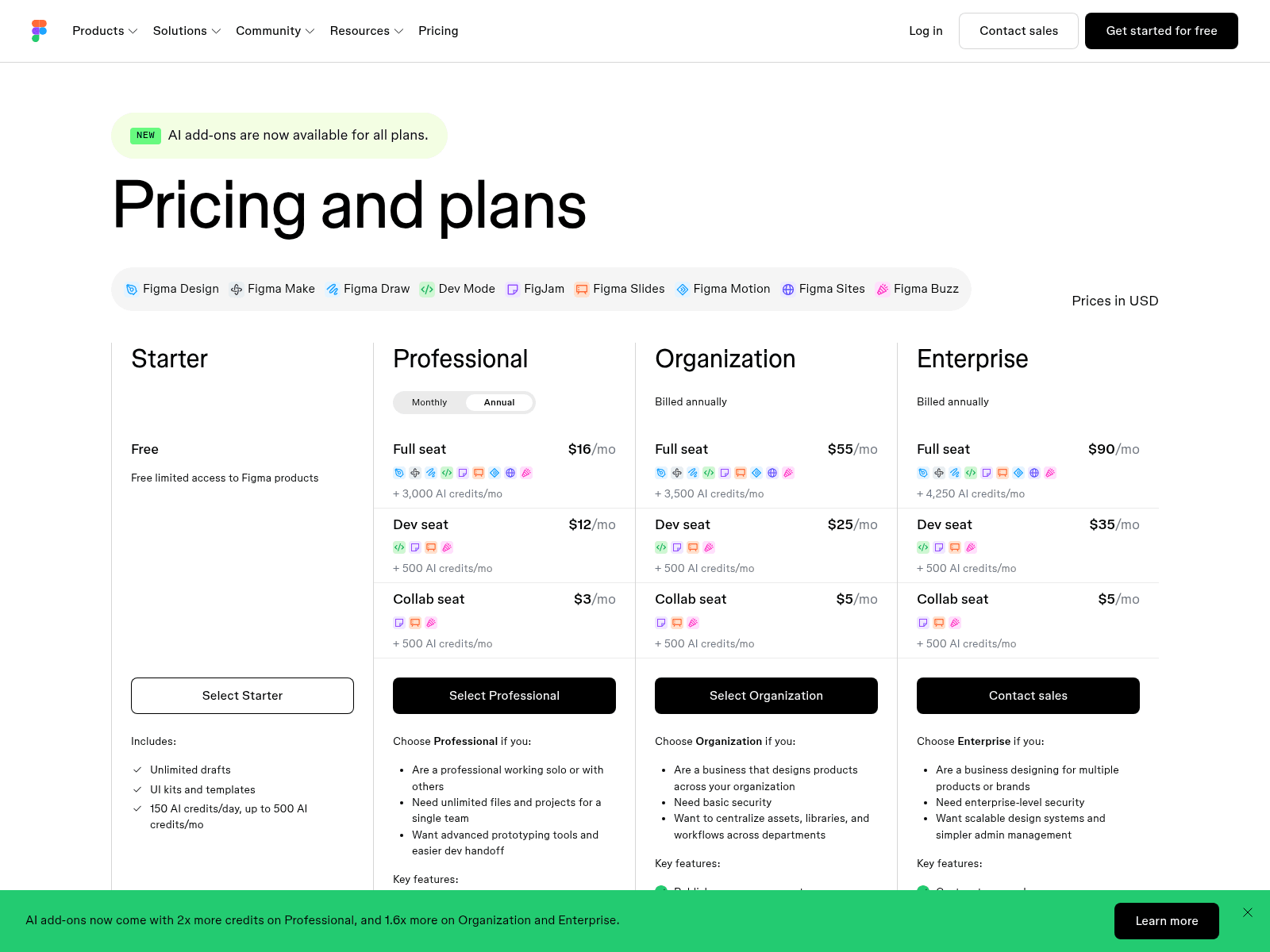
Professional seats cost $16 (Full), $12 (Dev) and $3 (Collab) a month on annual billing, or $20, $15 and $5 month to month. Organization ($55, $25 and $5) and Enterprise ($90, $35 and $5) bill annually only, and viewers are free on every paid plan.
Because Figma's pricing is per seat, the bill tracks each person's job. A designer needs a Full seat with all nine products, a developer a Dev seat with Dev Mode, FigJam, Slides and Buzz, and a workshop or deck maker a Collab seat with FigJam, Slides and Buzz.
What a small team pays: our example
Our one-year example at list prices starts with one person, then prices a team of one designer and four marketers three ways, with the math in each cell.
| Setup (our example) | Seats | Billed yearly | Billed monthly |
|---|---|---|---|
| Canva Pro, one person | 1 person | $144 | $216 ($18 x 12) |
| Figma Professional, one person | 1 Full seat | $192 ($16 x 12) | $240 ($20 x 12) |
| Canva Business, all five people | 5 people | $1,250 (5 x $250) | $1,500 (5 x $25 x 12) |
| Figma Professional, all five people | 1 Full + 4 Collab | $336 ($192 + 4 x $36) | $480 ($240 + 4 x $60) |
| Split: Figma for the designer, Canva Business for the marketers | 1 Full seat + 4 people | $1,192 ($192 + 4 x $250) | $1,440 ($240 + 4 x $300) |
The $336 row is the one to read twice. Its four Collab seats get view and comment access in Figma Design, plus FigJam, Slides and Buzz. They can't edit designs, and they can test Figma Make only in drafts they can't share or publish, because both of those take a Full seat.
Buzz is also still in beta, a Professional team can publish only five Buzz templates, and Figma's pricing page lists no approval step for Buzz, so $336 doesn't replace five people turning out templated posts in Canva every week.
The split row keeps each side in the tool built for its work, and on yearly billing it costs $58 less than putting all five people on Canva Business, or $60 less on monthly billing.
That saving holds only if a marketer or brand lead builds the Canva templates. If your designer builds them, the designer needs a Canva Business seat too, and the split costs $1,442 a year, $192 more than Canva Business alone.
Which one fits you
Find your role in the left column, then check that row against the prices above. If two rows fit, pick the one that matches most of your week.
| Who you are and what you make | Better fit | Why |
|---|---|---|
| A product designer working on app or web UI | Figma | Design, Dev Mode and Make on one Full seat |
| A developer building from finished designs | Figma | Dev Mode on a $12 Dev seat (billed annually) |
| A product manager who runs workshops and decks | Figma | FigJam and Slides on a $3 Collab seat (billed annually) |
| A marketer making social posts and ads each week | Canva | Templates, Magic Design and social scheduling on Pro |
| A brand lead with many people making assets | Canva Business | 100 Brand Kits and approvals |
| An illustrator or print designer with no budget | Affinity, from Canva | Free since late 2025; AI tools need a paid Canva plan |
| One designer working with a few marketers | Both | Figma for the designer, Canva for the rest |
| Someone who wants a hosted page, not a design file | Awesomic Studio | You describe the page, agents build and publish it, and our designers step in if they miss |
An investor deck is the one job this table can't settle, since Figma Slides and Canva Presentations both handle it and the story counts for more than the tool. A founder short on hours can hand the story and layout to one of the pitch deck design agencies instead.
Start with one real job
Both tools cost nothing to try, so test them on work you'd do anyway: build your most common asset in Canva Free and in Figma Starter, time each build, and have a colleague edit both.
If the job is a live page rather than a Canva or Figma file, there's a third option we built: Awesomic Studio, where you describe the page, AI agents build it and Studio hosts it, with one of our vetted designers stepping in when the agents miss.
Studio has no free plan: a month costs $20 on Basic, $200 on Pro or $500 on Maximum, and the whole fee becomes that month's usage budget. Get started with the one page you'd otherwise build in Canva or Figma this month.
FAQ
Is Canva easier to learn than Figma?
For a first design, yes: Canva starts you from a template or a prompt, while a new Figma file opens blank. Figma's extra learning pays back once components and libraries let one edit update dozens of screens, so it rewards people who design daily more than those who only open it now and then.
Can a marketing team use Figma instead of Canva?
Partly. Figma Buzz, Figma's beta tool for on-brand assets, and Figma Slides both come with the $3 Collab seat on annual billing, though Buzz caps a Professional team at five published templates. Canva Business gives the team 100 Brand Kits and approvals for $250 a year per person, so run a month of real posts through Buzz before moving everyone.
Is Figma Make the same as Canva Magic Design?
No. Figma Make turns a prompt and attached files into a clickable prototype or web app backed by real code, while Magic Design turns a prompt or photo into ready-made layouts from Canva's library. Canva Code is the nearer match to Make, since it builds interactive pages you can publish as a website.
Which is cheaper, Canva or Figma?
For one person, Canva Pro at $144 a year costs less than a Figma Professional Full seat at $192 on annual billing, and paying monthly it's $216 against $240. A team can pay less on Figma because Collab seats cost $3 a month billed annually, but those seats can't edit in Figma Design, so price the seats your people need.
Can developers build from a Canva design?
Developers can work from exported images and PDFs, but none of Canva's plans lists a developer handoff mode the way Figma lists Dev Mode. If developers will turn the design into a product, a Figma Dev seat ($12 a month billed annually) gives them Dev Mode. Canva Code suits another job: interactive pages Canva hosts for you.
One subscription and your hiring problems solved

FAQ


Awesomic is a revolutionary app that matches companies with vetted professionals across 30+ skill sets, from design and development to marketing and product. Based in San Francisco with a global core team, we offer a faster and more flexible alternative to traditional hiring through a subscription-based model. Awesomic delivers high-quality talent on demand, without the delays of recruiting.
We function as a subscription-based service that matches you to top-tier, vetted talent. Submit a project in just a few clicks and start receiving deliverables in as little as 24 hours. Scale your Awesomic plan up or down as your business needs change.
Every Awesomic subscription comes with unlimited revisions. You receive daily progress updates via the app, and you can provide feedback or request iterations as needed. If your project requires a different approach, you can request a talent rematch at any time, at no extra cost. You can also add teammates to collaborate and streamline feedback
A talent marketplace is a platform that utilizes data and intelligent matching algorithms to connect professionals with projects based on their skills, experience, and availability. While often used internally by large companies, Awesomic applies this model at scale, matching vetted global talent to your most critical business needs.
Hiring is time-consuming, expensive, and risky. Awesomic eliminates that problem. We rigorously vet all talent for technical ability, communication, and soft skills, ensuring only senior-level professionals work on your projects. You skip the job posts, interviews, and delays, and get straight to results.
No, Awesomic goes beyond design. While many clients utilize us for branding, UI/UX design, or motion graphics, we also provide vetted talent in no-code web development, product design, marketing, and more. Think of us as an extension of your team. A flexible, high-performing creative partner from planning to execution, whether you're building awesome products or scaling your team.
You can talk directly with your matched talent via the Awesomic app, connect via Slack, email, or schedule video calls. No matter the plan, you’ll receive daily updates in the app for every active task. You can also tag us in for any issues through our in-app customer chat.


