




Framer Pricing 2026: Every Plan Explained

Key takeaways:
- Framer charges per site. On yearly billing, Free is $0, Basic is $10 a month and Pro is $30 a month; on monthly billing, Basic is $15 and Pro is $45.
- Monthly billing costs 50% more on both paid plans, drops the complimentary custom domain, and raises every add-on by 20% to 50%.
- Only Pro can raise its page, CMS and bandwidth limits with paid add-ons, up to 700 pages, 40 CMS collections, 40,000 CMS items and 2 TB of bandwidth.
- Basic includes 1,000 AI credits a month and Pro 3,000, and Framer puts one generated landing page at about 300 credits.
With yearly billing selected, Framer's plan cards show four prices: $0, $10, $30 and a custom quote. Your real bill depends on five things: the billing cycle, the AI credits you pick, the number of editors, the number of languages and how far the site grows past its limits.
This guide covers Framer pricing plan by plan, then prices three real sites so you can read Framer website builder pricing as a monthly bill. We read every plan and add-on price off Framer's pricing page on September 11, 2026, once on yearly billing and once on monthly.
Framer pricing plans at a glance
Framer sells four plans, and the two self-serve paid ones, Basic and Pro, each have a yearly and a monthly price. The table lines them up with each plan's AI credits and the buyer Framer pitches it to.
| Plan | Yearly billing | Monthly billing | AI credits | Custom domain | Framer pitches it to |
|---|---|---|---|---|---|
| Free | $0 | $0 | 500, one time | No, Framer domain only | Non-commercial use |
| Basic | $10 a month | $15 a month | 1,000 a month | Yes, first year free on yearly | Students, freelancers and small studios |
| Pro | $30 a month | $45 a month | 3,000 a month | Yes, first year free on yearly | Teams at agencies, startups and scale-ups |
| Enterprise | Custom | Annual billing only | Custom, with volume discounts | Yes | Teams that need custom limits and dedicated support |
Enterprise is billed annually only and is the one plan without a public price. Here's Framer's own page with yearly billing switched on.
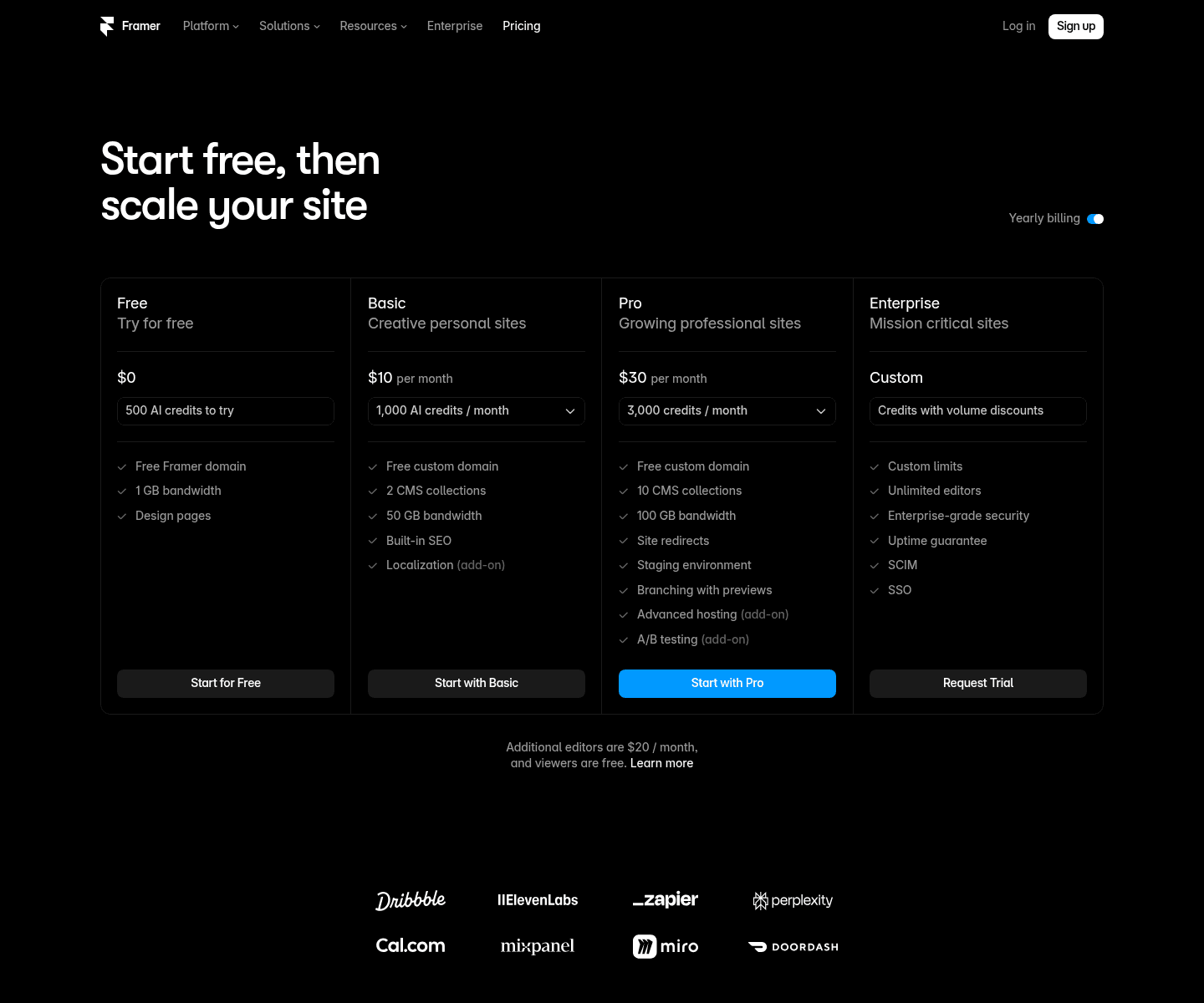
The monthly prices appear only after you flip that toggle. The per-locale and add-on prices sit lower down, in the comparison table under the cards.
Framer bills each site on its own plan, so three client sites need three plans, and it bills editor seats once per workspace. Webflow adds a layer Framer doesn't have, a workspace plan on top of the site plans, which is the first structural gap to check in a Framer vs Webflow cost comparison.
Why other articles still list a Scale plan
Framer has reworked its pricing twice in under a year, so Framer pricing articles from different months disagree. On October 9, 2025, it cut five plans to three (Basic, Pro and a $100 Scale plan) and retired Mini.
On June 16, 2026, it retired Scale, halved additional editor seats from $40 to $20, priced content editor seats at $10 and introduced AI credits. The same post says Basic "now includes 2 CMS collections, up from 1, and 50 GB of bandwidth, up from 10 GB."
Some articles dated after June 16 still list Scale, and others show $40 editors, one CMS collection on Basic or locale caps that vary by plan (both paid plans now allow 20). If you spot any of those, check the page's other numbers too.
Framer pricing monthly vs yearly: what the toggle changes
Switching from yearly to monthly billing raises both paid plans by 50%. Basic goes from $10 to $15 a month and Pro from $30 to $45. Over a year, that's $180 instead of $120 on Basic and $540 instead of $360 on Pro.
Two other things change. The complimentary custom domain disappears, since Framer gives the first year of a domain free only on yearly plans, and every add-on costs more. We read both columns off Framer's page with the toggle in each position.
| Item | Yearly billing | Monthly billing | Change on monthly |
|---|---|---|---|
| Basic plan | $10 a month | $15 a month | +50% |
| Pro plan | $30 a month | $45 a month | +50% |
| Additional editor (Basic, Pro) | $20 per editor | $30 per editor | +50% |
| Content editor (Basic, Pro) | $10 per editor | $15 per editor | +50% |
| Translation locale (Basic, Pro) | $20 per locale | $25 per locale | +25% |
| Extra pages (Pro) | $20 per 100 | $30 per 100 | +50% |
| Extra CMS collections (Pro) | $40 per 10 | $50 per 10 | +25% |
| Extra CMS items (Pro) | $20 per 10,000 | $30 per 10,000 | +50% |
| Extra bandwidth (Pro) | $40 per 100 GB | $50 per 100 GB | +25% |
| Convert (Pro) | $50 per 500,000 events | $60 per 500,000 events | +20% |
| Advanced hosting (Pro) | $200 | $250 | +25% |
| Bigger credit allowance (Basic 2,000 / Pro 5,000) | $20 / $50 plan total | $30 / $75 plan total | +50% |
| Complimentary custom domain | Included | Not included | Lost |
Framer's footnote says all prices are monthly and billed on the cycle you pick at checkout. Editors are the exception: its billing help says added editors, and any usage charges on a yearly plan, are billed monthly. So "$20 per editor" on yearly billing means $20 a month, charged monthly.
Monthly billing still suits short-lived sites. On the plans alone, a yearly price equals eight monthly payments ($120 ÷ $15, or $360 ÷ $45), so a site you'll run for under eight months costs less on monthly.
A four-month campaign site on Basic, for example, costs $60 on monthly billing against $120 for a yearly plan you'd abandon. The catch is the domain, which you'd have to bring yourself.
The Free plan: what you can build and what you can publish
Framer pitches Free as "ideal for non-commercial use." Your site runs on a Framer domain with a "Made in Framer" banner and 1 GB of bandwidth, plus a one-time allowance of 500 AI credits.
The design limits are generous. Framer's FAQ says Free projects "include access to 10 CMS collections, 1,000 pages, 5 MB file uploads, and one free locale to try." A workspace without a subscription also supports up to three editors.
Free's limits beat Basic's publishing limits of 2 collections and 30 pages, which looks backwards at first. Free is for building at full size, and Basic is for publishing on your own domain: to connect one, Framer says "you'll need to upgrade to a paid plan."
Free is also a no-cost place to choose between a template or custom design. Build your homepage in a ready-made layout, paste in your real copy, and see whether it holds up before a designer's hours go on the bill.
The plan fee is zero, but a full site still costs hours of your own design time. If you'd rather not spend them, that's the gap we built Awesomic Studio to fill: you describe the site, AI agents build it, and Studio hosts it.
Basic: $10 a month for a site with fixed limits
Basic costs $10 a month on yearly billing or $15 on monthly, and Framer aims it at "students, freelancers, and small studios." It includes a custom domain, 1,000 AI credits a month, 30 pages, 2 CMS collections, 1,000 CMS items and 50 GB of bandwidth, served from 20 CDN locations.
You also get built-in SEO, password protection, site search and 30 days of analytics, plus translation locales as an add-on. Redirects, staging and team roles all start at Pro.
Basic can't buy extra pages, collections, items or bandwidth, so a 31st page or a third CMS collection means moving to Pro. A website redesign that changes page URLs pushes you there too, because Basic has no redirects, so old links from search results land on error pages.
Bandwidth is the limit to watch. After Framer raised Basic from 10 GB to 50 GB, one user on Reddit reported that their video-heavy site "exceeded 50GB within 2 days with visitors as little as 500."
That's one person's experience, but at that rate even Pro's 100 GB would last about four days, and the commenter ended up moving the videos to YouTube. If your pages carry video, host it on a video platform, or price Pro's extra bandwidth at $40 per 100 GB before launch.
Basic at no cost for students
Students get Basic free, a plan Framer says is "worth $120 per year," with the same 1,000 AI credits a month. Apply with a school email and a photo of your student ID, and re-apply every 11 months while you're a student. For now, Framer says, only new customers can redeem the code.

Pro: $30 a month, then pay for what you use
Pro costs $30 a month on yearly billing or $45 on monthly. Framer pitches it to "teams at agencies, startups, and scale-ups who run their full marketing stack on Framer."
What Pro adds over Basic
Pro adds the site tools Basic lacks: redirects, a staging environment, branching with previews, 5 static files, and roles and permissions. It also brings 3,000 AI credits a month, 90 days of analytics and more than 300 CDN locations instead of 20.
The CDN jump matters because load time moves conversions. In Milliseconds Make Millions, a Deloitte and 55 study for Google across 37 brand sites and 30 million+ sessions, a 0.1-second gain on four mobile speed metrics lifted retail conversions 8.4% and travel conversions 10.1%.
Retail shoppers in that study also spent 9.2% more. The study didn't test Framer, but if your visitors span continents, weigh the CDN row before you pick a plan.
How Pro's limits grow
On Pro, four limits can be raised in priced steps up to a hard ceiling. The table sets them against Basic's fixed limits, with Convert and static files at the bottom.
| Limit | Basic (fixed) | Pro included | Pro ceiling with add-ons |
|---|---|---|---|
| Site pages | 30 | 150 | 700 |
| CMS collections | 2 | 10 | 40 |
| CMS items | 1,000 | 2,500 | 40,000 |
| Monthly bandwidth | 50 GB | 100 GB | 2 TB |
| Convert events | Not available | Add-on | 1.5 million |
| Static files | None | 5 | 50 with Advanced hosting |
Pro grows in blocks of 100 pages, 10 collections, 10,000 items or 100 GB, priced in the monthly-vs-yearly table. Framer's FAQ caps Pro with add-ons at the figures in the right-hand column.
Enterprise: custom limits and annual billing
Enterprise's card lists custom limits, unlimited editors, enterprise-grade security, an uptime guarantee, SCIM, SSO and credits "with volume discounts." The comparison table adds every CDN location, unlimited analytics history and Advanced hosting.
Where Pro stops at the ceilings in the table above, Enterprise's limits are custom. Billing is annual only, Enterprise can also pay by bank transfer, and the card's button requests a trial instead of showing a price.
Framer AI pricing plans: how credits work
Framer AI pricing plans follow the site plans. Every paid plan includes monthly credits "that power Agents, Localization, and other AI features," shared across the workspace and its editors.
Credits attach to each site plan, so they stack: per Framer's help center, "a workspace with two projects on the Basic Site plan receives 2,000 AI credits per month." They renew on each plan's billing date, and external agents you connect yourself are free during the preview.
What a credit buys
Framer's June 16, 2026 post puts typical costs on its base model at about 300 credits for a new landing page, 150 to make a page responsive, 100 for a large edit and 50 for a small one. Model choice shifts that: Sonnet 4.6 costs 0.9x, GPT 5.5 (the default) 1x and Opus 4.8 1.8x.
So a landing page on Opus 4.8 costs roughly 540 credits (300 × 1.8). The same post says Basic's 1,000 credits cover "around five" landing pages and Pro's 3,000 "about ten."
Pro's figure matches that per-page cost (3,000 ÷ 300 = 10), but Basic's comes to about three (1,000 ÷ 300 ≈ 3.3). The post adds that "exact costs depend on the size and complexity of the work," so budget for three generated landing pages a month on Basic, not five.
When credits run out
Framer's help center is blunt: "Credit-using features pause when the monthly allowance is reached." You can upgrade, or add a recurring AI Credits add-on and then buy one-time top-ups, which expire "at the end of the calendar month in which they're bought."
Canceling the add-on removes its extra credits at once, so keep it running until a build ships. Each plan card also prices a bigger monthly allowance: on yearly billing, Basic with 2,000 credits costs $20 a month instead of $10, and Pro with 5,000 costs $50 instead of $30. On monthly billing, the same picks cost $30 and $75.
A few habits stretch the allowance or keep it from running out mid-build:
- Draft on Sonnet 4.6 (0.9x) instead of the default, and save Opus 4.8 for pages that keep missing.
- Click "Mark as Bad" on any result that misses, since Framer refunds those credits.
- Start big builds right after your renewal date, when the allowance resets.
- Set up the recurring add-on before launch week, since top-ups require it.
- Build from Claude Code, Cursor or Codex over MCP, which runs on your own Claude or OpenAI subscription.
If you'd rather hand the whole build to a person than prompt an agent, we match you with vetted Framer designers and developers in up to 24 hours.
Framer localization pricing: $20 a locale
Framer localization pricing is per locale: $20 a month each on yearly billing or $25 on monthly, on Basic or Pro, up to 20 locales. Framer can translate the pages with AI, or you can enter translations yourself.
Framer's help center defines locales as "the languages your website can be translated into," one language each, so price every translation you add. Two translations cost $40 a month on yearly billing, and all 20 cost $400, more than 13 times Pro's own $30. AI translation also spends plan credits, though translations you type in yourself never do.
Whether the spend pays off depends on your buyers. CSA Research found that 76% of online shoppers prefer to buy products with information in their native language, and 40% will never buy from websites in other languages. Its 2020 survey covered 8,709 consumers in 29 countries.
For client work, the per-locale charge can be a sticking point. One commenter in a March 2025 Reddit thread, written before the current plans, said: "Agreed locales are expensive and it's always the biggest friction point with my clients. I mention it early in the scoping so that it's not a bad surprise later."
That's a single commenter's experience, and the same comment ends by defending the price: "$20 per month is a small price to pay to reach an entire new market." Price locales in the first scoping call so they never land as a surprise.
Editors, seats and the two Pro add-ons
Viewers are free on every plan, and so is the workspace owner on Basic and Pro. Anyone else with edit access takes a paid seat, billed per workspace rather than per site, and Basic and Pro allow up to 10 people with edit access. An additional editor ($20 a month on yearly billing, $30 on monthly) can design, edit content and publish.
A content editor ($10 or $15) can only update the CMS, handle localization and make on-page edits. Seats are charged within 24 hours of being added, so keep reviewers as free viewers until they need to edit. Members of Framer's Pro Experts program get "free editor access on any client project" and "save 50% on agent credits."
A $20 seat is the cheap part of adding a person. The bigger cost is the person, and choosing between a monthly web design package and a full-time salary moves your budget far more than any seat price.
Convert and Advanced hosting
Pro has two add-ons Basic can't buy. Convert covers A/B testing, funnels and customization with Triggers, and it bills by events (page views, tracked-link clicks and tracked form submissions): $50 per 500,000 on yearly billing, up to 1.5 million events and 5 A/B tests. At 1 million events, that's $100 a month.
Advanced hosting costs $200 a month on yearly billing and comes included on Enterprise. It puts multiple sites under one domain with up to 6 rewrites, 50 static files and custom Permissions-Policy, Referrer-Policy and X-Frame-Options headers, which suits a Framer site folded into a larger domain.
Framer website pricing for three real sites
Plan prices mean little until you add a real site's seats, locales and bandwidth. Here are three setups on both billing cycles.
| Site | What you buy | Yearly billing | Monthly billing |
|---|---|---|---|
| Portfolio | Basic, owner only | $10 ($120 a year) | $15 ($180 a year) |
| Startup marketing site | Pro + 1 additional editor + 1 content editor | $60 ($30 + $20 + $10) | $90 ($45 + $30 + $15) |
| Agency-built site with two translations | Pro + 2 additional editors + 2 translation locales + 100 GB extra bandwidth | $150 ($30 + $40 + $40 + $40) | $205 ($45 + $60 + $50 + $50) |
The portfolio costs only the plan, since the owner seat is free. Over a year, the startup site costs $720 on yearly billing or $1,080 on monthly, and the agency site $1,800 or $2,460, a $660 gap from the billing cycle alone.
Each setup has a trigger that changes the bill. A portfolio that needs redirects, staging or a third CMS collection must move to Pro, tripling its yearly plan price, while an agency site that stays under Pro's included 100 GB drops to $110 a month on yearly billing, or $155 on monthly.
None of these totals includes the build. If one of the Framer agencies designs your site, its fee sits on top, and Framer's bill keeps running after the handover. Judge Framer website builder pricing as the plan plus the people who run it.
Limits, refunds and the fine print
A few billing rules sit outside the plan cards. At certain limits, Framer asks you to upgrade; for others, bandwidth among them, it says "we allow you to exceed your limit for one month" and emails you.
Listed prices exclude sales tax, which Framer adds at checkout based on your location. You can pay by card or, in some regions, PayPal.
Refund rules are spread across three Framer pages. The pricing FAQ mentions only EU and Turkey residents, who get 14 days. Framer's Refund Policy page adds a worldwide window "within 7 days of the initial purchase," and a table in its billing help article agrees, so outside the EU and Turkey, ask within the first week.
Downgrading mid-term doesn't return cash either. Framer turns the unused value into account credit, which "Cannot be refunded." The Refund Policy adds that usage add-ons, such as bandwidth or credits, are non-refundable once any part is used.
Rules like these are where the hidden CMS costs come from, and they make Framer pricing harder to predict than the cards suggest. Run these checks before you pay:
- Count your pages, CMS collections and CMS items against Basic's fixed 30, 2 and 1,000.
- Decide whether you need redirects, staging or roles, since each means Pro.
- Multiply the languages you'll add by $20, or $25 on monthly billing.
- Compare last month's bandwidth use with 50 GB on Basic or 100 GB on Pro.
- Choose the billing cycle last, once you know how long the site will run.
Once a site runs a full year, yearly billing costs less on both paid plans and every add-on. Keep monthly for short campaigns.
Which Framer plan to pick
Framer pricing rewards you for knowing your site's size before you buy. Start from what the site must do:
- Stay on Free while you design and test, since it can't publish to your own domain.
- Pick Basic for a portfolio or small site of up to 30 pages whose URLs won't change.
- Pick Pro when you need redirects, staging, roles and permissions, or more than 2 CMS collections.
- Ask Framer about Enterprise once you'll outgrow Pro's ceilings or need SSO.
Whichever plan you pick, price the seats and locales too, since together they can cost more than the plan. For some teams, design and build hours outweigh all of it.
In Awesomic Studio, you describe the site in plain words, AI agents such as Codex and Claude Code build it in a shared workspace, and Studio publishes and hosts it. Studio also connects to Framer, and you can export what the agents build to code or other tools.
Where the agents fall short, Awesomic's own designers and developers, the talent behind 20,000+ delivered projects, step in on the same build. We don't offer Studio as a CMS or an ecommerce builder, so if your team edits CMS collections every week, Framer is the better home.
Studio costs $20, $200 or $500 a month, and each price is that month's usage budget. Studio has no free plan or trial, and we don't publish a rate per build. Get started on the $20 plan with a one-page brief, and judge the output before you raise the budget.
FAQ
Is Framer free to use?
Yes, for building and testing. Free costs $0 with a Framer domain, 1 GB of bandwidth and a one-time 500 AI credits, but connecting your own domain takes a paid plan, from $10 a month.
How much is Framer per month?
On yearly billing, Basic works out to $10 a month and Pro to $30. Monthly billing raises those to $15 and $45, and Enterprise is quoted and billed annually.
Does Framer charge per site or per user?
Both. Framer website pricing is per site, so each published site needs its own plan, while editor seats on Basic or Pro are billed per workspace: $20 a month for an additional editor or $10 for a content editor on yearly billing, with the owner and viewers free.
How much does Framer localization cost?
A locale runs $20 a month on yearly billing and $25 on monthly, with up to 20 on Basic or Pro. Three translations come to $60 a month on yearly billing, and AI translation also uses credits.
Does Framer AI cost extra?
Not within your allowance of 1,000 AI credits a month on Basic or 3,000 on Pro. Framer AI pricing adds cost only when you want more: a 2,000-credit Basic plan is $20 a month billed yearly or $30 billed monthly, and a 5,000-credit Pro plan is $50 or $75.
One subscription and your hiring problems solved


FAQ


Awesomic is a revolutionary app that matches companies with vetted professionals across 30+ skill sets, from design and development to marketing and product. Based in San Francisco with a global core team, we offer a faster and more flexible alternative to traditional hiring through a subscription-based model. Awesomic delivers high-quality talent on demand, without the delays of recruiting.
We function as a subscription-based service that matches you to top-tier, vetted talent. Submit a project in just a few clicks and start receiving deliverables in as little as 24 hours. Scale your Awesomic plan up or down as your business needs change.
Every Awesomic subscription comes with unlimited revisions. You receive daily progress updates via the app, and you can provide feedback or request iterations as needed. If your project requires a different approach, you can request a talent rematch at any time, at no extra cost. You can also add teammates to collaborate and streamline feedback
A talent marketplace is a platform that utilizes data and intelligent matching algorithms to connect professionals with projects based on their skills, experience, and availability. While often used internally by large companies, Awesomic applies this model at scale, matching vetted global talent to your most critical business needs.
Hiring is time-consuming, expensive, and risky. Awesomic eliminates that problem. We rigorously vet all talent for technical ability, communication, and soft skills, ensuring only senior-level professionals work on your projects. You skip the job posts, interviews, and delays, and get straight to results.
No, Awesomic goes beyond design. While many clients utilize us for branding, UI/UX design, or motion graphics, we also provide vetted talent in no-code web development, product design, marketing, and more. Think of us as an extension of your team. A flexible, high-performing creative partner from planning to execution, whether you're building awesome products or scaling your team.
You can talk directly with your matched talent via the Awesomic app, connect via Slack, email, or schedule video calls. No matter the plan, you’ll receive daily updates in the app for every active task. You can also tag us in for any issues through our in-app customer chat.


