




Framer vs Webflow: Which Is Better in 2026?

Key takeaways:
- Framer fits a designer-run marketing site: Pro is $30 a month per site on yearly billing ($45 monthly), with 10 CMS collections and 2,500 items.
- Webflow fits content-heavy and selling sites: Premium is $25 a month yearly ($39 monthly) with 40 collections and 20,000 items, and ecommerce starts at $29.
- A second designer costs a $39 Full seat a month on Webflow (yearly billing), against a $20 extra editor on Framer, which is where Webflow's cheaper site plan stops being cheaper.
- In HTTP Archive's August 2026 Chrome real-user data, 70.6% of tracked Framer sites and 71.2% of tracked Webflow sites passed all three Core Web Vitals on mobile.
You can build a sharp marketing site on either tool, so the Framer vs Webflow decision turns on what happens after launch. Four questions settle it: who edits the site, how much structured content it holds, whether it sells anything, and how many client sites you run.
We read both vendors' pricing and feature pages, plus Framer's help center, in September 2026, so every price in this Framer vs Webflow comparison comes from the vendor's own page. For site speed, we used Chrome's real-user data rather than opinion.
The short answer
Pick Framer if a designer or a small design team will own a site that's mostly landing pages, a modest blog and plenty of motion. Framer's editor behaves like a design canvas, and its per-site Pro plan is sized for that kind of site.
Pick Webflow if the site will hold a few thousand to 20,000 CMS items, sell products, or may need to move to another host one day. It asks more of whoever builds the site, and in return you get a bigger included CMS, native checkout and a code export for static pages.
Freelancers should decide by who pays and who edits after handover. Both tools document handing a live site to the client's own account, so the split is editing: Webflow includes free client seats even on its free Starter workspace, while Framer charges for each extra editor outside its Pro Experts program.
The sections below back each call with data. And if neither learning curve fits the weeks you have before launch, our own Awesomic Studio is a third route, which we cover at the end.
What Framer and Webflow are in 2026
Start with how each vendor now describes itself.
Framer, the design canvas that became an AI agent
Framer's homepage hero calls it "the AI design agent for every step from idea to launch." You still design on a canvas, though, with animations and effects built into it.
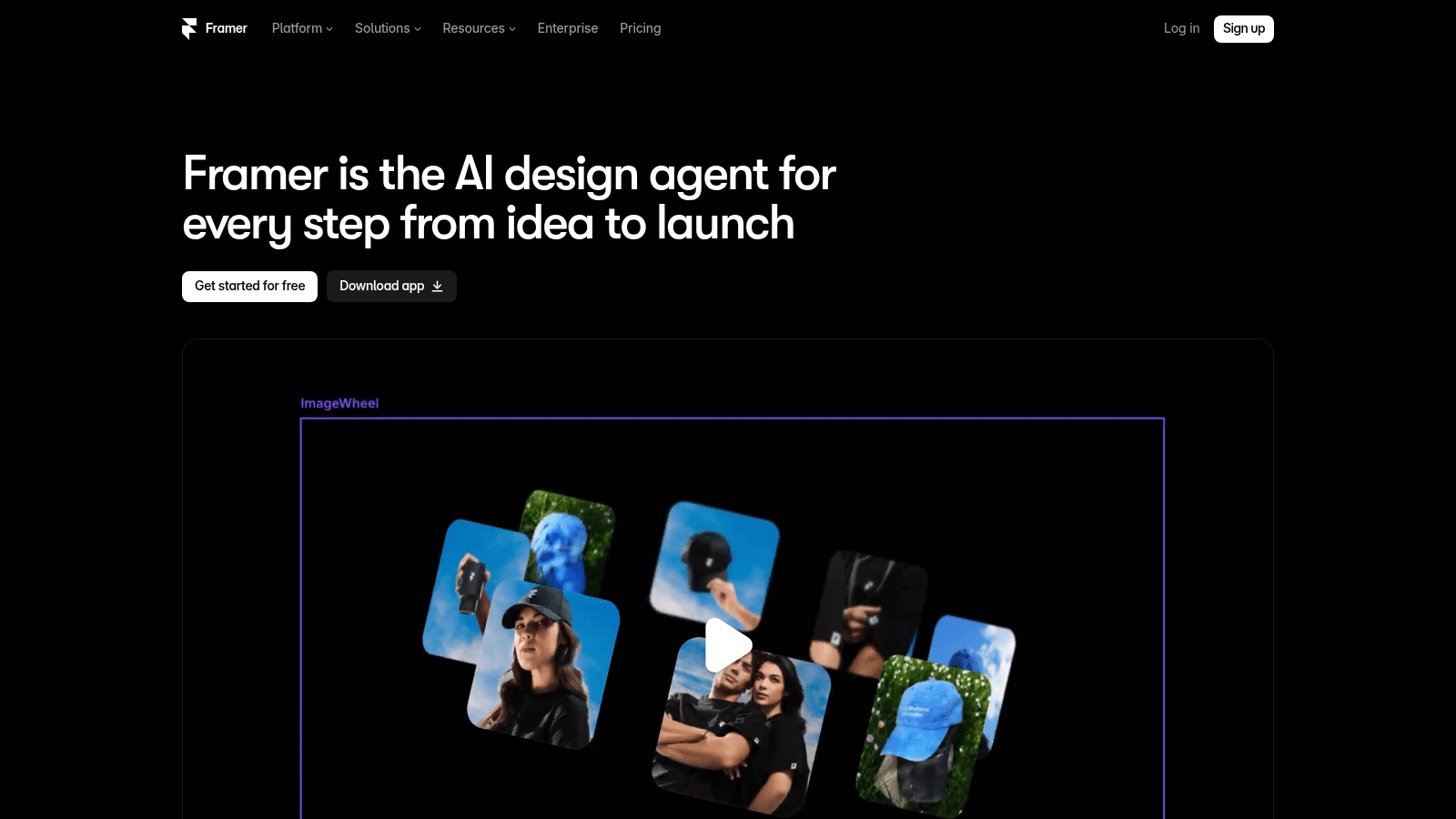
Behind the pitch sit four per-site plans: Free, Basic, Pro and Enterprise. Paid plans include monthly AI credits for Framer's Agents and localization (1,000 on Basic, 3,000 on Pro), and Pro's limits flex, so a site pays for extra pages, CMS items or bandwidth as it uses them.
Webflow, the visual development platform
Webflow's homepage leads with "Build for what's next" and says it "gives every team the tools to build, manage, and grow a website that drives real revenue." Underneath is a visual development platform with a CMS, native ecommerce and hosting.
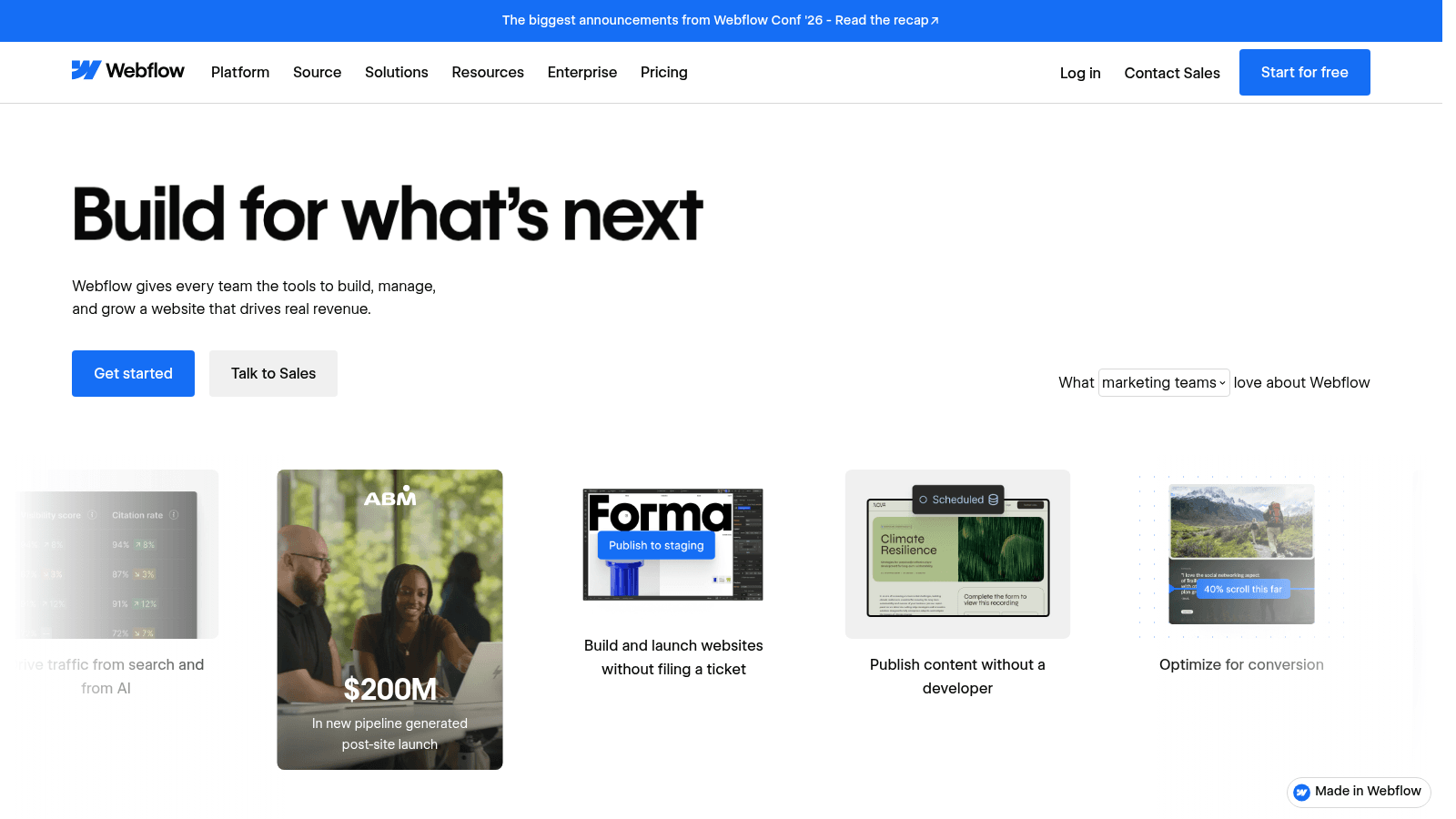
The team focus runs through the pricing, which layers workspace and seat plans over the per-site plans and puts a $2,500-a-month Team plan above Premium. Webflow AI and an MCP server appear on every site plan, including free Starter.
Framer and Webflow side by side
This Framer vs Webflow features comparison uses each vendor's own pricing and product pages, read in September 2026. Where a feature is an add-on, the table says so.
| Feature | Framer | Webflow |
|---|---|---|
| How you pay | One plan per site, plus editor seats | A site plan, plus a workspace plan and seats |
| CMS on the cheapest paid plan | Basic: 2 collections, 1,000 items | Basic: no CMS |
| CMS on the plan most teams compare | Pro: 10 collections, 2,500 items | Premium: 40 collections, 20,000 items |
| Native ecommerce | No store or checkout plan listed | Three plans, 500 to 15,000 ecommerce items |
| Redirects | Pro and Enterprise only | 301 redirects on paid site plans |
| Localization | Add-on, up to 20 locales | Localize add-on, up to 10 locales |
| Code export | Two help articles disagree | Static pages only, on paid workspace plans; no reimport |
Framer keeps most costs on one per-site plan plus editor seats, while Webflow spreads the same needs across site, workspace and seat plans. That split drives most of the pricing gaps in the next section.
Framer vs Webflow pricing
Both vendors price their core plans per site, and both charge more on monthly billing than on yearly. If a Webflow vs Framer comparison you're reading mentions a Webflow plan called CMS, or Framer plans called Mini and Scale, it's out of date, because none of those appear on either pricing page now.
Site plans on yearly and monthly billing
Prices are per site, per month, in US dollars.
| Plan | Yearly billing | Monthly billing |
|---|---|---|
| Framer Free | $0 | $0 |
| Framer Basic | $10 | $15 |
| Framer Pro | $30 | $45 |
| Webflow Starter | $0 | $0 |
| Webflow Basic | $15 | $25 |
| Webflow Premium | $25 | $39 |
| Webflow Team | $2,500 | Annual contract only |
Framer's complimentary custom domain comes with yearly billing only, so monthly billing costs you the domain on top of the higher price. Here's Framer's page as it read in September, yearly billing selected.
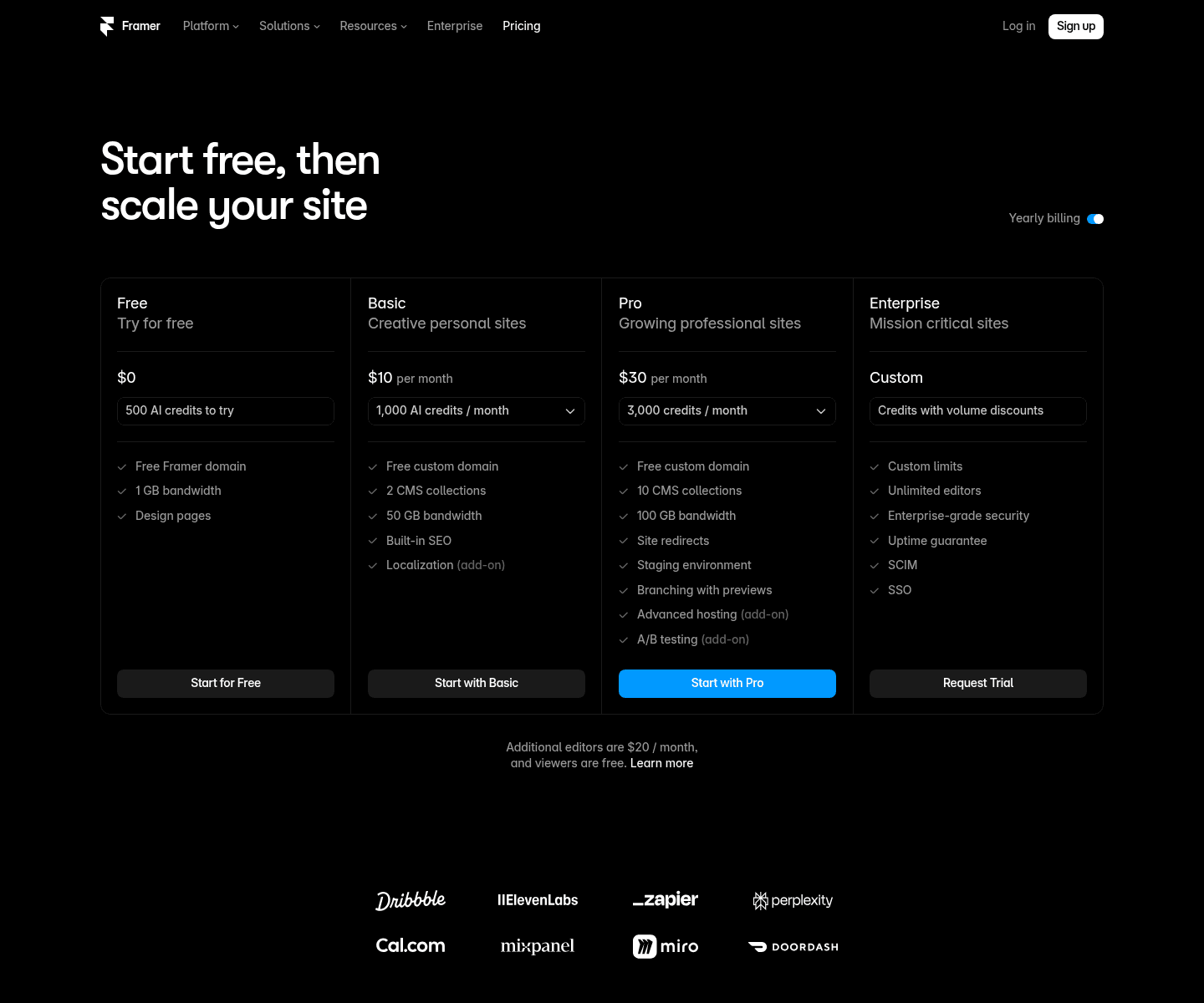
Pro can buy extra pages, CMS collections, CMS items and bandwidth, while Basic can't. Every Framer add-on also costs more on monthly billing, so choose the billing cycle as carefully as the plan when you work out your Framer pricing.
Webflow's Team plan is a different class of purchase: at $2,500 a month on an annual contract, with Webflow Localize included, it's priced for organizations rather than a single marketing site. Webflow's page files it under platform plans, next to custom-priced Enterprise.
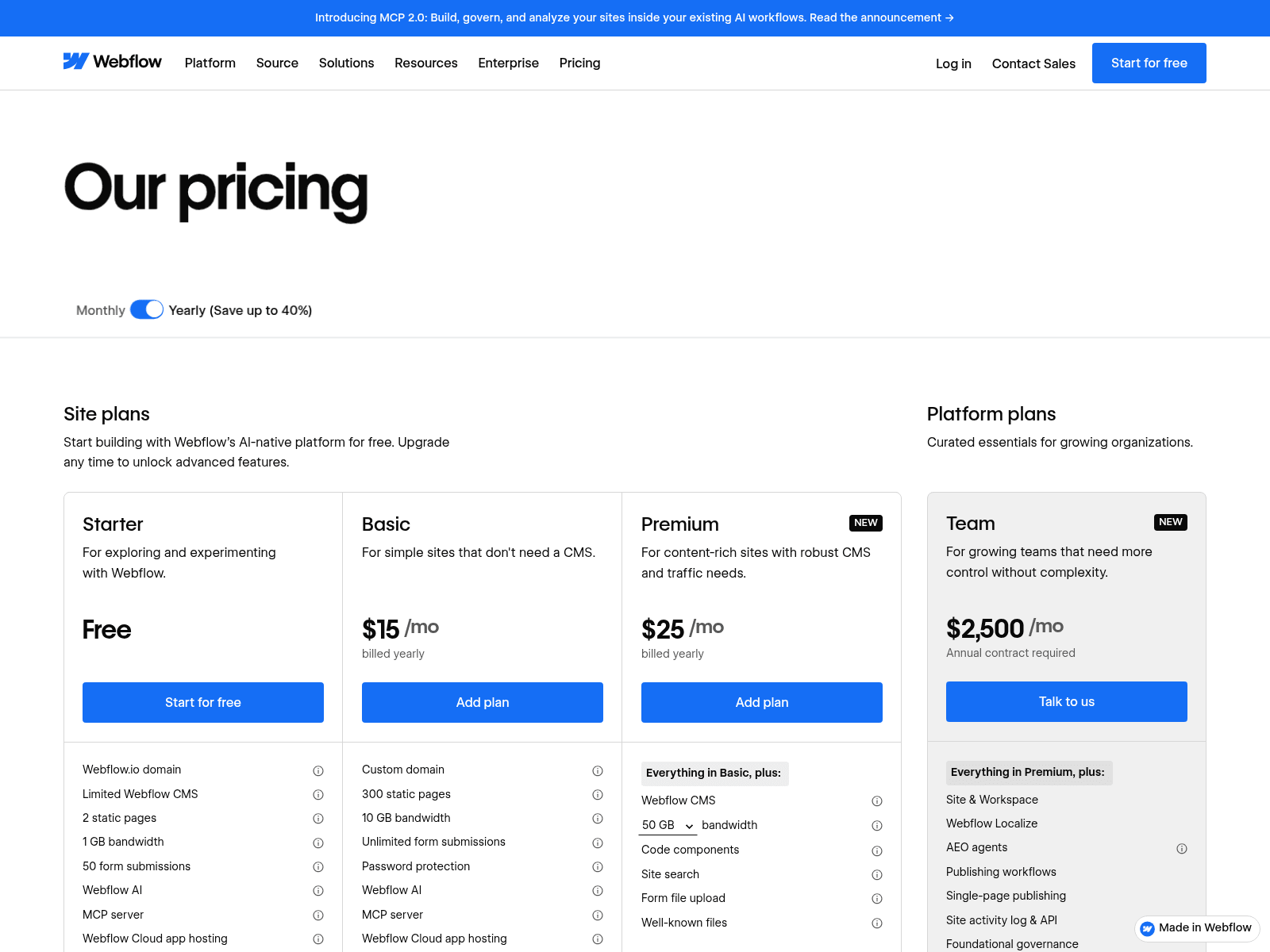
The site plan is only the first line of a Webflow bill, and two more can follow it.
Webflow's workspace and seat layer
Webflow sells workspaces separately from site plans. For teams there's Starter, free with 1 full seat and 2 staging sites (work-in-progress sites on webflow.io addresses, before a site plan); Core at $19 a month yearly or $28 monthly, which adds 10 staging sites, code export and shared libraries; and Growth at $49 or $60, with unlimited staging sites, site-level roles and publishing permissions.
Seats are the third line. A Full seat costs $39 a month yearly or $45 monthly, with one included, while a Limited seat, for editing content or building pages with components, costs $15 or $19. Reviewer seats are free, as viewers are on Framer.
A like-for-like example
Take a marketing site with a CMS and one designer. On yearly billing that's Framer Pro at $30 against Webflow Premium at $25, and on monthly billing it's $45 against $39. A small site that fits Framer Basic's 2 collections and 1,000 items pays $10 instead ($15 monthly), without redirects or staging.
Adding people changes the picture. On yearly billing, a second designer costs $20 a month on Framer or a $39 Full seat on Webflow, and a content-only editor costs $10 on Framer against a $15 Limited seat. Monthly billing lifts Framer's editors to $30 and $15, against Webflow's $45 and $19.
One extra language costs $20 a locale on Framer or $9 for the first locale on Webflow's Localize Essential, both yearly. If your team needs Core or Growth features, add that workspace plan to the Webflow side yourself.

Design, interactions and code
Framer works like a design tool at heart. You arrange layouts on a canvas, animations and effects come built into it, and Framer lists external AI agents as free on Basic and Pro while that feature is in preview.
Webflow lists Interactions and GSAP, a JavaScript animation library, among its product features. GSAP's pricing page says the library is "now 100% free for all users, thanks to Webflow's support," and that it's "maintained by the original GSAP team - working full time at Webflow." On the build side, custom code comes with both paid site plans, and Premium adds code components.
In practice, Framer rewards visual designers, while Webflow rewards builders who are comfortable with page structure and reusable components. Whole studios now build on Webflow full time, as our list of Webflow design agencies shows.
CMS and content editing
Included CMS capacity is where the two differ most on paper. Framer Pro's 10 collections and 2,500 items can grow to 40 and 40,000 with add-ons, while Webflow Premium includes 40 and 20,000 up front.
Content editing is priced as its own role on both. Framer's content-editor seat covers the CMS, localization and on-page edits, and Webflow's Limited seat covers content plus page-building with components, so neither forces a writer onto a full design seat.
Before you commit, map out what your content will look like a year from now.
- List every repeating content type, such as blog posts, case studies, team members and job openings, as its own collection.
- Estimate how many items each collection will hold in 12 months, not today.
- Count the people who will edit content but never touch design.
- Mark the collections that need translation, since translation is sold as an add-on on both platforms' lower plans.
If your year-one count stays within 10 collections and 2,500 items, Framer Pro covers it with no add-ons. Between 2,500 and 20,000 items, Webflow Premium's included allowance is usually the simpler buy. Past 20,000 the math reverses: Framer Pro's item add-ons reach 40,000 for at most $110 a month on yearly billing (before any extra collections), while Webflow's next step up is the $2,500 Team plan.
Framer vs Webflow SEO: controls and real-user speed
The SEO differences sit in plan-level controls and in real-user speed.
SEO controls by plan
Framer's Basic plan lists "Built-in SEO," but site redirects are Pro and Enterprise only, so choose Pro if you're moving an existing site with URLs worth keeping. Webflow's comparison table lists 301 redirects and XML sitemap controls on its paid site plans, along with an AI-powered SEO and AEO audit.
Webflow's AEO agents sit at the top of its range, and its own pages disagree on where: the pricing page lists them in the $2,500 Team plan, while the AEO feature page says they're for Enterprise customers. Neither Basic nor Premium includes them.
What real-user data shows
Speed claims in a typical Webflow vs Framer comparison rest on opinion, so we pulled the real-user numbers instead. The HTTP Archive Technology Report tracks Core Web Vitals by platform from Chrome UX Report data, and its August 2026 figures cover 9,437 Framer and 51,753 Webflow origins on desktop, plus 11,240 and 60,684 on mobile.
Each figure below is the share of origins rated "good" on that metric.
| Metric | Framer desktop | Framer mobile | Webflow desktop | Webflow mobile |
|---|---|---|---|---|
| All three Core Web Vitals | 87.1% | 70.6% | 82.1% | 71.2% |
| Largest Contentful Paint (LCP) | 94.3% | 82.5% | 93.5% | 78.1% |
| Cumulative Layout Shift (CLS) | 92.8% | 94.4% | 87.6% | 93.5% |
| Interaction to Next Paint (INP) | 98.1% | 80.2% | 99.3% | 88.6% |
Framer sites pass more often on desktop, and on mobile the two are level. Framer's weak spot is mobile INP, which measures how quickly a page responds to clicks, taps and key presses: 80.2% of Framer origins pass, against 88.6% for Webflow.
Webflow's weak spot is mobile Largest Contentful Paint, where 78.1% of origins pass against Framer's 82.5%. These shares are platform-wide, so your own images, scripts and embeds still decide your score.
Why rendering matters on any builder
Google's Search Central documentation says "Google processes JavaScript web apps in three main phases: Crawling, Rendering, Indexing," and that pages waiting to render "may stay on this queue for a few seconds, but it can take longer than that." The lesson for any site builder is to make sure your important text is in the HTML the server sends.
Here's how to check any published page on either platform.
- Open the live page in Chrome and press Ctrl+U (Command+Option+U on a Mac) to show its HTML source.
- Search the source for your H1 and for a sentence from the middle of the page.
- If the page lists CMS items, search for one item's title too.
- If anything is missing, run Test live URL in Google Search Console's URL Inspection tool, then open View tested page to see the HTML and screenshot Google got back.
Run it once per template rather than once per page, since pages built from the same template are generated the same way.
Ecommerce, localization and scale
Selling is the simplest split here, because Framer's pricing page has no store or checkout plan at all. Webflow sells three ecommerce plans per site, sized by how many products you list.
Standard costs $29 a month yearly ($42 monthly) for 500 ecommerce items with a 2% Webflow transaction fee, Plus $74 ($84) for 5,000, and Advanced $212 ($235) for 15,000, the last two with no Webflow fee. Stripe or PayPal processing fees apply on all three.
Both sell localization per locale, with different caps. Framer offers up to 20 translation locales on Basic and Pro, while Webflow's Localize Essential covers up to 3 locales and Advanced up to 10, adding localized URLs, asset localization and automatic visitor routing.
At the top end, Framer Pro's add-ons max out at 700 pages, 40,000 CMS items and a 2 TB bandwidth ceiling before Enterprise, while Webflow Premium stops at 20,000 CMS items and the next step is the $2,500 Team plan. Both sell A/B testing as an add-on: Convert on Framer Pro, and Optimize on Webflow from $299 a month (yearly).
If you run a SaaS marketing site with a changelog, a resource library and localized landing pages, all of them draw on these limits. Ask the SaaS web design agencies you're weighing how they'd structure that CMS before you pick the platform.
Freelancers, agencies and client handover
Framer vs Webflow for freelancers comes down to who pays after handover and how the client edits the site. Webflow sells plans built around that question, while Framer mostly prices it per editor.
Webflow's Freelancer workspace costs $16 a month yearly ($24 monthly) and targets "freelancers with a small client roster," while the Agency workspace costs $35 ($42) for "agencies with a large client roster." Even the free Starter workspace includes "1 free client seat per paid site."
Webflow's freelancer page describes two handover routes. If a client wants "full ownership of their site in their own Workspace," Webflow says "you can transfer it to them with just a few clicks." The other route is working inside the client's workspace, with guest access that Webflow says comes "at no extra cost."
Framer's freelancer perks run through its Pro Experts program, whose members get free editor access on client projects and half-price agent credits. Framer also documents Project Transfers for handing a site to a client: "The site remains live during the transfer, and any connected custom domain stays intact." Outside the program, each extra editor costs the standard rate.
Handover itself can be light. One designer on Reddit wrote after launching a first Framer site for a client that "client handover was ridiculously simple with the remix link, very impressed." That's one person's experience from May 2024, and Framer now documents a formal Project Transfer for the same job.
Whichever platform you pick, settle these points in writing before the build starts.
- Whose card pays for the site plan after launch.
- Which workspace or account holds the site at handover.
- How many client staff will edit, and whether they need full or content-only seats.
- Who owns the domain and the analytics accounts.
- What happens to the site and its hosting if your retainer ends.
Agencies that resell sites under their own brand face the same questions one step removed, so ask any white-label web design provider which platform they build on and whose account holds the finished site.
Export, lock-in and moving later
Leaving is the part most comparisons skip, so here are each vendor's own words.
Webflow's pricing FAQ says: "You can export your site and host it anywhere you like with any of our paid Workspace plans, no attribution required. Note: Dynamic content must be exported on a collection-by-collection basis and forms will stop working." It adds that "If you export your code, it can't be reimported," and code export is listed under the Core workspace.
Framer's help center gives two answers. An article titled "Can I export my website to HTML and self-host it?" says: "Framer does not offer HTML export for self-hosting."
A second article, "Porting your data from Framer," written around the EU Data Act that took effect in September 2025, says: "Every Framer site is published as standard HTML, CSS, JavaScript, and static assets. You can download these files at any time and move them to any hosting provider." Both pages were live when we checked in September 2026.
Until Framer reconciles them, plan any exit from Framer as a rebuild: export your CMS content (Framer says plugins can output CSV or JSON), list every URL for redirects, and recreate the design on the new platform.
Webflow's route is cleaner but not complete: its help center says exported code leaves out CMS content, ecommerce and localized pages, and that forms and site search stop working, the same failures we list for anyone trying to copy a website off the host that ran it.
Webflow vs Framer pros and cons
Here are the Webflow vs Framer pros and cons that matter most once a site is live. Framer's strengths are a canvas designers already understand, built-in motion, a simpler bill and the higher desktop pass rate in August's Core Web Vitals data.
Framer's weaknesses appear as the site grows. Redirects and staging need Pro, included CMS capacity stops at 2,500 items before add-ons, there's no store plan to buy, mobile INP trails Webflow, and the help center contradicts itself on export.
Webflow's strengths are depth and a written exit route: 20,000 CMS items on Premium, native ecommerce, and freelancer and agency workspaces with free client seats. Its weaknesses are the layered bill, where anyone designing full sites needs a $39 Full seat (yearly) once the included seat is taken, an export that covers static pages only and can't be reimported, and weaker mobile LCP than Framer.
If WordPress is also on your list, the comparison shifts to hours: our Webflow vs WordPress comparison concluded Webflow saves more time for a team with no developer running a mostly marketing site. Settle that question first, since it decides whether this one matters.
How to choose for your situation
Find the row that matches your situation, then check it against the prices and limits above. Where two rows apply, the content or selling row usually wins, since those limits are the hardest to work around.
| Your situation | Better fit | Why |
|---|---|---|
| A designer runs a marketing site with a small blog | Framer | Canvas-first editing; Pro fits 2,500 CMS items |
| A content team publishes 2,500 to 20,000 CMS items | Webflow | Premium includes 20,000 CMS items and 40 collections |
| The CMS will grow past 20,000 items | Framer | Pro add-ons reach 40,000 items for at most $110 a month |
| The site sells products | Webflow | Native ecommerce from $29 a month, yearly |
| A freelancer hands sites to clients who'll edit them | Webflow | Free client seats, even on the free Starter workspace |
| A studio builds motion-heavy one-off sites | Framer | Motion lives in the canvas |
| You may leave the platform within two years | Webflow | Code export for static pages on paid workspaces |
| You need a site soon and neither learning curve fits | Awesomic Studio | Agents build and host it from a description, with a designer on standby |
If the table points to Webflow but nobody on your team has time to learn it, hand the build to someone who already knows the platform, such as the vetted Webflow developers we match clients with. The table's answer stays the same; only the builder changes.
Where to start: Framer, Webflow or a third route
Start with one page, not the whole site. If your row points to Framer or Webflow, build your key landing page on its free plan, publish it on the free Framer or webflow.io address, and run the source check before you pay for anything.
If neither editor fits the time you have, Awesomic Studio is the third route we built. It skips the editor question entirely: you write what the site needs, AI agents build it, and Studio puts it live on its own hosting. It connects to eight tools, Webflow and Framer among them, and can export to code or other tools.
When the agents can't get it right, an Awesomic designer takes the project over, and as our FAQ puts it, "The human safety net is built in, not an upsell." Those designers come from Awesomic's own talent pool, where we accept only the top 0.82% of designer and developer applicants.
Studio has limits worth knowing before you try it. Its page lists no CMS or ecommerce features, so a content team that edits collections every day belongs in Framer or Webflow, and there's no free plan or published rate per build. Plans cost $20, $200 and $500 a month, and each price equals that month's usage budget.
Write a one-paragraph brief for the page you need most, then Get started on the $20 Basic plan and see what the agents return.
FAQ
Is Framer better than Webflow for SEO?
The real-user data doesn't settle it: in HTTP Archive's August 2026 figures the two sat within a point of each other on mobile, with Framer ahead on desktop. The practical gap is redirects, which Framer reserves for Pro and Enterprise, while Webflow's Basic and Premium site plans both list 301 redirects.
Is Framer cheaper than Webflow?
At the entry level, yes: Framer Basic includes a small CMS for $10 a month on yearly billing, while Webflow's cheapest paid site plan with a CMS is Premium at $25 (free Starter includes a 50-item CMS but no custom domain).
On the plans most teams compare, Webflow Premium's $25 undercuts Framer Pro's $30 until people join, since an extra designer costs $20 on Framer against a $39 Webflow Full seat.
Can you move a site from Framer to Webflow?
Yes, but as a rebuild, because Webflow's pricing FAQ says you can't import a website or its code: "you can only develop websites in Webflow." Content is the part that moves, since Framer says plugins can export your CMS collections as CSV or JSON. Rebuild the pages in Webflow, bring the content into its CMS, and set redirects before you switch the domain.
Which is better for freelancers?
Webflow, if clients will edit their own sites: its Freelancer and Agency workspaces cost $16 and $35 a month on yearly billing, and even the free Starter workspace includes a free client seat per paid site. Framer documents Project Transfers that hand a live site to the client's account, and its Pro Experts program adds free editor access on client projects.
Does Framer have ecommerce?
Framer's pricing page doesn't list a store or checkout plan, so if the site needs to sell, Webflow is the native option of the two. Its ecommerce plans start at $29 a month on yearly billing for 500 ecommerce items, with a 2% Webflow transaction fee on top of Stripe or PayPal processing fees.
One subscription and your hiring problems solved


FAQ


Awesomic is a revolutionary app that matches companies with vetted professionals across 30+ skill sets, from design and development to marketing and product. Based in San Francisco with a global core team, we offer a faster and more flexible alternative to traditional hiring through a subscription-based model. Awesomic delivers high-quality talent on demand, without the delays of recruiting.
We function as a subscription-based service that matches you to top-tier, vetted talent. Submit a project in just a few clicks and start receiving deliverables in as little as 24 hours. Scale your Awesomic plan up or down as your business needs change.
Every Awesomic subscription comes with unlimited revisions. You receive daily progress updates via the app, and you can provide feedback or request iterations as needed. If your project requires a different approach, you can request a talent rematch at any time, at no extra cost. You can also add teammates to collaborate and streamline feedback
A talent marketplace is a platform that utilizes data and intelligent matching algorithms to connect professionals with projects based on their skills, experience, and availability. While often used internally by large companies, Awesomic applies this model at scale, matching vetted global talent to your most critical business needs.
Hiring is time-consuming, expensive, and risky. Awesomic eliminates that problem. We rigorously vet all talent for technical ability, communication, and soft skills, ensuring only senior-level professionals work on your projects. You skip the job posts, interviews, and delays, and get straight to results.
No, Awesomic goes beyond design. While many clients utilize us for branding, UI/UX design, or motion graphics, we also provide vetted talent in no-code web development, product design, marketing, and more. Think of us as an extension of your team. A flexible, high-performing creative partner from planning to execution, whether you're building awesome products or scaling your team.
You can talk directly with your matched talent via the Awesomic app, connect via Slack, email, or schedule video calls. No matter the plan, you’ll receive daily updates in the app for every active task. You can also tag us in for any issues through our in-app customer chat.


