




Figma Pricing in 2026: What You Really Pay

Key takeaways:
- Figma's Professional Full seat costs $16 a month billed annually or $20 monthly, while Organization ($55) and Enterprise ($90) bill annually only.
- Dev seats ($12 to $35) and Collab seats ($3 to $5) cost far less, and people who only view and comment pay nothing on paid plans.
- Each seat includes 500 to 4,250 AI credits a month, enforced since March 2026, and top-up credits are priced in your admin dashboard, not on the pricing page.
- On annual Professional, seats added mid-year bill at the monthly price ($20 for a Full seat) until you move them onto the annual subscription.
Figma pricing looks like one number: $16 a month for a Full seat on Professional. Your bill is rarely that simple. It depends on your mix of Full, Dev and Collab seats, the rules for people added mid-year, the AI credits each seat carries, and features that sit one plan above yours.
Figma's own results show how spend grows at its bigger accounts. Figma's Q2 2026 10-Q reports a net dollar retention rate of 136%, up from 129% a year earlier. That figure follows the customers who were paying Figma more than $10,000 a year twelve months earlier, and it means that group now pays about 36% more, even after counting the accounts that cut back or left.
This guide walks through Figma plans and pricing seat by seat, then prices four common team sizes with the arithmetic shown. Swap in your own headcount and you'll have your own number.
Figma pricing plans at a glance
Figma sells four plans, and each paid plan has three seat types with their own prices. The pricing page shows Professional on annual billing by default.
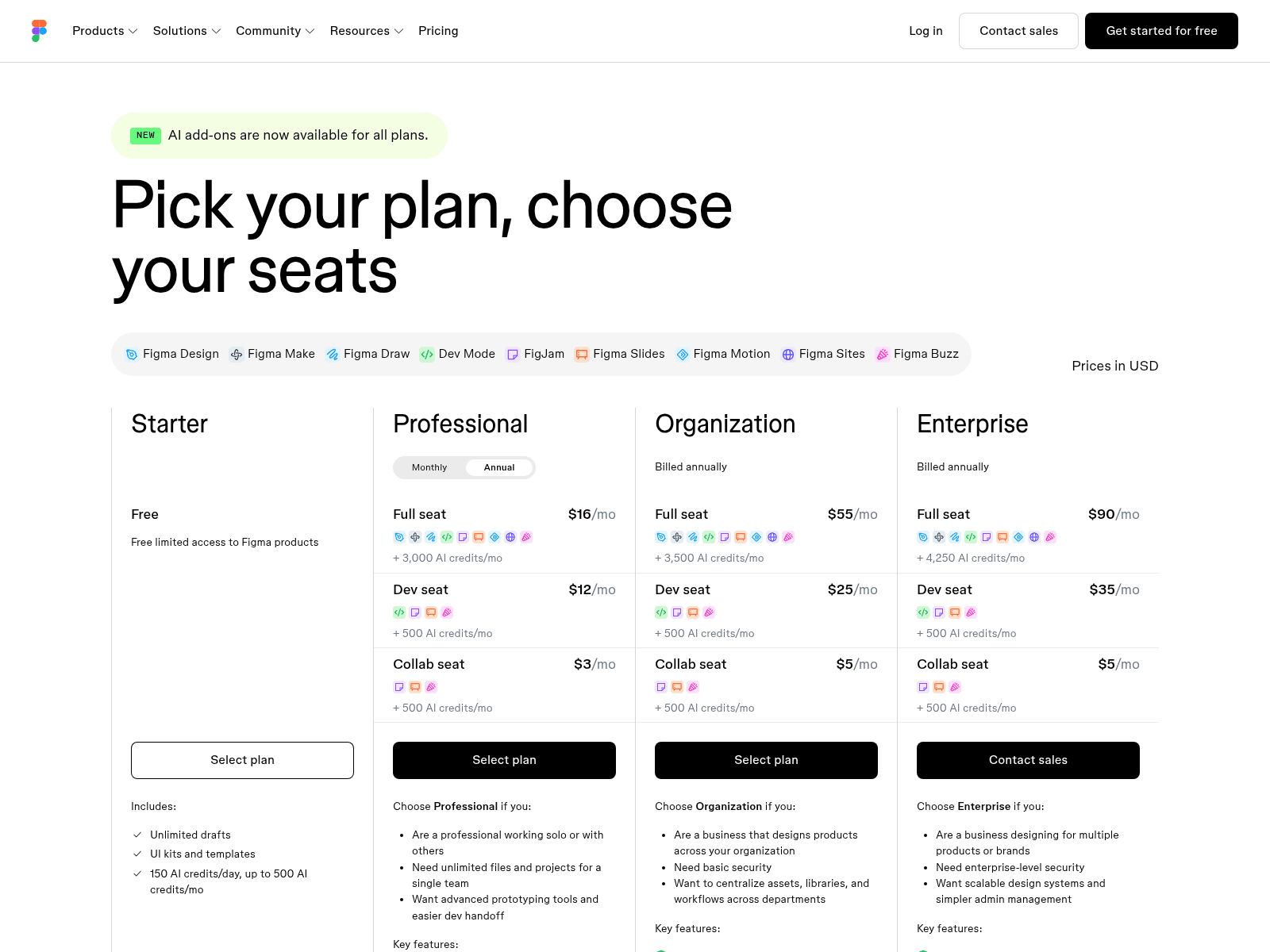
Flip Professional's toggle to Monthly and its three seats cost $20, $15 and $5. Organization and Enterprise have no toggle because both bill annually only. The full grid follows, with each seat's monthly AI credits.
| Plan | Full seat | Dev seat | Collab seat | AI credits per seat, per month | Billing |
|---|---|---|---|---|---|
| Starter | Free | n/a | n/a | 500, capped at 150 a day | Free |
| Professional | $16 annual, $20 monthly | $12 annual, $15 monthly | $3 annual, $5 monthly | Full 3,000; others 500 | Annual or monthly |
| Organization | $55 | $25 | $5 | Full 3,500; others 500 | Annual only |
| Enterprise | $90 | $35 | $5 | Full 4,250; others 500 | Annual only |
Prices are per seat per month, in US dollars. Monthly billing adds 25% to a Professional Full or Dev seat and about two-thirds to a Collab seat, which is the price of being able to drop seats month to month.
Watch for stale numbers when you research Figma pricing. Some roundups dated 2026 still quote Figma's retired Professional price: $15 per editor a month, or $12 on annual billing.
Figma dropped that single-editor price on March 11, 2025, when it moved to Full, Dev, Collab and View seats, so an editor now needs a Full seat at $16 or $20. The retired figures happen to match today's Dev seat prices, which makes the error easy to miss.
What each seat type includes
Figma plans and pricing are built around seats, and the products aren't sold separately. The pricing FAQ is blunt: "No, you cannot buy Figma Design on its own." You pick a plan, then give each person a seat.
Full seat
Designers need a Full seat. It includes Figma Design, Figma Make, Figma Draw, Figma Sites (in beta), Dev Mode, FigJam, Figma Slides and Figma Buzz, and the Figma Motion beta runs on it too.
That bundle makes a Full seat an expensive way to meet one need. A marketer who wants one landing page from Figma Sites pays the same $16 to $90 as a product designer, with seven other products attached. Our own Awesomic Studio prices that job differently, with a monthly usage budget instead of a seat.
Dev and Collab seats
A Dev seat gives its holder the full versions of Dev Mode, FigJam, Slides and Buzz, plus view and comment rights in Figma Design. That person can inspect designs but not edit them, which suits developers building from finished files.
A Collab seat covers FigJam, Figma Slides and Figma Buzz, with view and comment rights in Figma Design and basic inspection in Dev Mode. At $3 a month on annual Professional and $5 on every other paid option, it fits product managers who run FigJam workshops or build decks in Slides.
Free view access
Viewers don't need a paid seat. On any paid plan, Figma says "you can let others view and comment on your files without purchasing extra seats." Viewers can read measurements and property values, copy CSS, iOS and Android code, export assets, comment and use cursor chat.
Check that free view access whenever you compare Figma with other product design software. A tool with a cheaper editor seat can still cost more if it charges for every stakeholder who opens a file.
Figma AI pricing: how credits work
Figma AI pricing runs on one credit system shared by every AI feature. Each seat includes a monthly allotment, and anything beyond it costs extra.
How many credits each seat gets
Full seats get 3,000 credits a month on Professional, 3,500 on Organization and 4,250 on Enterprise. Dev, Collab and View seats get 500, as does everyone on Starter. Starter users and View seats also hit a daily cap of 150 credits.
Credits belong to the person holding the seat. They reset monthly, don't roll over and can't be shared or transferred, so a user who runs out can't borrow a colleague's unused credits. Unless your plan has bought extra credits, that user is blocked from AI actions until their credits reset or an admin adds more. Figma's 10-Q dates the change: "In March 2026, we began enforcing AI credit limits."
Figma's help center says your own usage history gives the most accurate estimate of what AI work will cost, so until you have a month of it, other users' reports are a rough guide.
In a thread about the new limits, one Figma user on Reddit built "one small interactive component for a client" and reported "120 credits to make it. Another 80 to fix something it missed." That's one person's experience, but 200 credits for a small component is a useful yardstick against a 3,000-credit seat.
Topping up when credits run out
Admins can top up two ways, and they can combine them. A credit subscription adds a shared monthly pool that users draw on after their seat credits run out, while pay-as-you-go billing charges for extra use up to a monthly spending limit.
The rate isn't on the pricing page. Figma's help center says you "can see the current pay-as-you-go rate from the Add credits flow in your admin dashboard," so start there:
- Open the Add credits flow and note the pay-as-you-go rate and the monthly credit tiers.
- Check "People at seat credit limit" in the admin dashboard's AI credits view; on Organization and Enterprise, admins can also view earlier periods and export usage as a CSV.
- Buy a credit subscription if several people run short every month, since the price per credit drops on bigger tiers.
- Use pay-as-you-go with a low spending limit if shortfalls are rare.
- On Organization or Enterprise, treat the subscription as an annual commitment: it's prorated onto your next quarterly invoice and can only be lowered or canceled in the 30 days before renewal, so start with a small tier.
One Reddit user in r/FigmaDesign said they "managed to end my 3000 company credits in like 3 hours" and that a "mere 1000 credits cost 24 bucks." Treat that $24 as one person's report rather than Figma's price, and check the rate in your own dashboard.
The Figma agent is free during its beta
Figma's pricing FAQ says the agent, still in beta, uses no credits: "AI credits are not consumed for any prompts or actions." It also warns that "once the AI agent becomes generally available, standard AI credit usage will apply."
Track how often your team uses the agent now, because those habits will cost credits later. On Organization and Enterprise, admins can export beta AI usage as a CSV from the AI credits dashboard by hovering over "Credits used in beta not included" and choosing Download CSV.

Figma Dev Mode pricing
Figma Dev Mode pricing is simpler than some articles suggest, because Dev Mode isn't a paid add-on. It comes with every Full and Dev seat on Professional, Organization and Enterprise, though not on Starter. You switch it on with what Figma's FAQ calls "the green toggle in the top right hand corner."
A developer's cheaper route is the Dev seat: $12 a month on annual Professional ($15 monthly), $25 on Organization and $35 on Enterprise. That's $4 a month less than a Full seat on annual Professional ($5 on monthly), $30 less on Organization and $55 less on Enterprise.
Professional's card lists "advanced Dev Mode inspection and MCP Server," and Code Connect for your own components needs Organization or Enterprise, since Professional gets it only for UI kits.
Some developers don't need a paid seat at all, since free viewers on a paid plan get basic inspection. Before buying a Dev seat, check whether all of these describe the person's work:
- The developer mostly reads measurements and property values.
- Copied CSS, iOS or Android code covers what they take from a file.
- Exporting assets and commenting is the rest of their Figma work.
- They don't need Professional's advanced Dev Mode inspection.
- They don't pull Figma files into an AI coding tool through Figma's MCP server.
- Your team doesn't use Code Connect.
If every line fits, keep that developer on free view access and save $12 to $35 a month. If one doesn't, buy a Dev seat, not a pricier Full seat with design editing the job doesn't need. The MCP line is a hard limit: a View seat gets 6 MCP tool calls a month on paid plans, against 200 a day for a Dev seat on Professional.
Figma Enterprise pricing and the Organization plan
Figma's two upper plans bill annually only, and the per-seat jump is steep. Figma Enterprise pricing is $90 per Full seat, $35 per Dev seat and $5 per Collab seat a month, against $55, $25 and $5 on Organization.
What Organization adds
Organization suits a business designing products across several teams. On the admin side it adds SSO, activity logs and centralized admin tools, and it's the first plan with the design-system features listed in the feature table below. For 10 designers, Full seats go from $160 a month on annual Professional to $550, an extra $4,680 a year.
What Enterprise adds
Enterprise adds SCIM seat assignment, custom team workspaces, guest access controls and the option to restrict access to external content. Governance+, a bundle of advanced access, sharing and compliance tools, is an add-on "only available on Enterprise plan," priced through sales.
Figma's pricing page shows no minimum seat count for Enterprise and no contract length beyond "Billed annually," so get both in writing from sales. Those controls earn their cost once several product teams share one design org and enterprise UX work becomes a question of who can see, edit and export each file.
Figma features and pricing: which plan gets what
Many upgrades start with a gate: a feature you need sits one plan up. Here's how Figma features and pricing line up, taken from Figma's compare table for a Full seat.
| Feature | Starter | Professional | Organization | Enterprise |
|---|---|---|---|---|
| Variable modes | None | 10 | 20 | Unlimited, via extended collections |
| Video in prototypes | Figma Community videos only | Upload your own | Yes | Yes |
| Team libraries, advanced prototyping, AI productivity and image editing, Weave tools | No | Yes | Yes | Yes |
| Shared fonts, branching and merging | No | No | Yes | Yes |
| Library analytics and organization-wide design systems | No | No | Yes | Yes |
| Multi-brand design systems, design system theming and APIs | No | No | No | Yes |
| Version history | 30 days | Unlimited | Unlimited | Unlimited |
Variable modes are an easy gate to hit by accident. Figma counts modes per variable collection, so six product lines with a light and a dark theme each, built as one collection with a mode for every pair, need 12 modes: two over Professional's limit of 10 but well inside Organization's 20. If the six are separate brands, Figma's compare table puts multi-brand design systems on Enterprise.
If you're building one design system for every team, budget for Organization from day one, since org-wide design systems, shared fonts and branching start there. Five designers then cost $275 a month in Full seats instead of $80.
What you really pay: four team scenarios
A price list becomes a budget only when you multiply it by a real team. This table prices four team shapes at list price, with the arithmetic shown so you can swap in your own headcount.
| Team | Plan and billing | Seats | Arithmetic | Per month | Per year | AI credits included |
|---|---|---|---|---|---|---|
| Solo freelancer | Professional, annual | 1 Full | 1 x $16 | $16 | $192 | 3,000 |
| Solo freelancer | Professional, monthly | 1 Full | 1 x $20 | $20 | $240 | 3,000 |
| Startup product team | Professional, annual | 3 Full, 4 Dev, 5 Collab | (3 x $16) + (4 x $12) + (5 x $3) | $111 | $1,332 | 13,500 |
| Startup product team | Professional, monthly | 3 Full, 4 Dev, 5 Collab | (3 x $20) + (4 x $15) + (5 x $5) | $145 | $1,740 | 13,500 |
| Scale-up | Organization, annual | 10 Full, 15 Dev, 20 Collab | (10 x $55) + (15 x $25) + (20 x $5) | $1,025 | $12,300 | 52,500 |
| Large company | Enterprise, annual | 40 Full, 60 Dev, 100 Collab | (40 x $90) + (60 x $35) + (100 x $5) | $6,200 | $74,400 | 250,000 |
On the startup rows, monthly billing costs $408 more a year than annual for the same 12 people. If you're a startup setting a design budget for the year, annual saves that $408 and fixes the price of the seats you start with. Hires still bill monthly until you fold them in, and if headcount will swing, monthly billing lets unused seats lapse.
The credit column is a sum of individual allotments, and seat credits can't be pooled. The startup's 13,500 is really three people with 3,000 each and nine with 500. No row includes AI top-ups, Governance+ or mid-year seats, so treat each figure as a floor.
Billing rules that raise the bill mid-year
The pricing page shows what a seat costs on day one of your term. Billing rules decide what it costs when you add someone in month seven, and they differ by plan.
New seats on an annual Professional plan
A seat added mid-term on Professional doesn't join your annual subscription. Figma bills it separately at the monthly price, prorated from the day an admin approves it, and it stays monthly "unless you proactively add those seats to your annual subscription or remove the seats."
Say the startup above hires two designers in month four. The pair bills at $40 a month instead of $32 until someone moves them to the annual plan. That's $8 a month, or $96 for every year the pair stays on monthly billing, and it repeats with every hire nobody reconciles.
New seats on Organization and Enterprise
On these annual-only plans, admins approve every new seat that costs money. Approved seats land on your next invoice, prorated to the end of the annual term, and new seats are invoiced quarterly, so a hiring spurt shows up as a bigger quarterly bill.
As the team grows, seat approvals become part of scaling DesignOps, so give one person the job of approving and reclaiming seats. Seat requests go to organization admins, or on Enterprise plans with billing groups, to each group's billing group admin, so that person needs one of those roles.
Downgrades, unused seats and custom domains
Professional downgrades happen in the admin dashboard, while Organization and Enterprise require contacting sales, so start early. On monthly Professional, "any seats that are unassigned throughout the month will not renew the following month," which suits a team whose headcount changes often.
Custom domains for Figma Sites and Figma Make are the open question. Figma's help center still says "Custom domains are free of charge through 2025," with up to 10 on Professional, and that "these limits are subject to change after 2025." Figma hasn't published what changes, so don't budget on free domains lasting.
How to lower your Figma bill
Software spending is rising faster than IT spending overall. Gartner's July 2026 forecast puts worldwide software spending at $1.47 trillion in 2026, up 15.5%, while total IT spending grows 14.2% to $6.37 trillion.
Gartner's John-David Lovelock says "technology budgets are being strained by inflation, supply shortages, rising hardware and memory costs, AI funding initiatives and shifting priorities." A seat review cuts cost without taking away a tool anyone actually uses.
Time it for the 30 days before renewal. Figma gives no prorated refund when you move someone to a cheaper seat mid-term, and the seat they leave keeps billing until you drop it at renewal, so work through these steps then:
- List each paid seat and what its holder did last month: edited designs, built from them, or only viewed.
- Move people who only view and comment to free view access.
- Move FigJam and Slides users who don't edit designs from Full seats to Collab, saving $13 a month each on annual Professional and $50 on Organization once the freed Full seats come off at renewal.
- Give developers a Dev seat instead of a Full seat.
- Fold mid-year Professional seats into your annual subscription with Add seats in the admin dashboard's Total seats table.
- Switch Professional to annual once headcount is stable, cutting Full and Dev seats by 20% and Collab seats by 40%.
- Set a spending limit on pay-as-you-go AI credits before anyone needs one.
- In the renewal modal, lower each seat type to the number you now use, so the seats you freed don't renew.
- If you no longer use the feature that moved you to Organization, raise a downgrade with sales before renewal.
If the number still doesn't work, compare Figma alternatives against your trimmed bill, not today's. Switching brings its own costs in migrated files and retraining, so the seat review is worth doing first either way.
Getting pages built without buying seats
Some Full seats exist so a non-designer can get a working page out of Figma Make or Figma Sites. Figma's 10-Q warns investors about the same mismatch: "Our seat-based subscription model may become less aligned with customer value creation as AI automates or consolidates work that historically required multiple users."
When the output you need is a live page rather than a design file, you may not need the seat at all. Awesomic Studio, which we build at Awesomic, turns a plain-language brief into a live page or app and hosts it, on a flat monthly plan that doubles as your usage budget.
The plans run $20 (Basic), $200 (Pro) and $500 (Maximum) a month, so the $200 plan buys $200 of agent usage that month. Figma is one of the eight tools Studio connects to, and if a build stalls, one of Awesomic's designers or developers takes it from there. Awesomic is backed by Y Combinator.
Know the trade-offs. We don't publish a rate per build or per model, so you can't price a page in advance, and Studio has neither a free tier nor a trial. Studio isn't a vector editor either, which keeps your design system and vector work in Figma.
Which Figma plan fits your team
Read Figma pricing from the work outward. If one or two people edit and everyone else views, annual Professional with free view access is the cheapest paid setup. Move to Organization for a shared design system across teams, more than 10 modes in one variable collection, or branching, and to Enterprise when you need SCIM seat management, guest controls or Governance+.
If the gap is design capacity rather than software, a seat won't close it, because $16 to $90 a month buys the tool and not the designer who uses it. Budget for that person separately from the Figma bill.
If a working page is all you'd buy a Full seat for, test the idea on Awesomic Studio's $20 Basic plan, our smallest. Get started by picking a plan, then describe the first page you want built.
FAQ
Is Figma free to use?
Yes, on Starter. It includes unlimited drafts, UI kits and templates, and up to 500 AI credits a month with a 150-credit daily cap. You can co-edit with unlimited people on up to 3 files of 3 pages each, in one team and one folder, and version history stops at 30 days.
How much is Figma per month?
A Full seat costs $16 a month on annual Professional, $20 monthly, $55 on Organization and $90 on Enterprise. A Dev seat costs between $12 and $35, and a Collab seat between $3 and $5. Figma pricing is per seat, so two Full seats and one Dev seat on annual Professional cost $44 a month.
Is Dev Mode free for developers?
Only partly. Complete Dev Mode access needs a Full or Dev seat on a paid plan, and a Dev seat costs $12 to $35 a month. Free viewers on paid plans get basic inspection, code copying and asset export. That covers a developer who only reads specs, but not one who feeds designs to an AI coding tool, since View seats get just 6 MCP calls a month.
How much does Figma Enterprise cost?
Figma Enterprise pricing is published per seat: a Full seat lists at $90 a month, a Dev seat at $35 and a Collab seat at $5, all billed annually. At list price, 20 Full and 20 Dev seats cost $2,500 a month, or $30,000 a year. Governance+ is an Enterprise-only add-on priced through sales.
Does Figma AI cost extra?
Not up to your allotment. Full seats include 3,000 to 4,250 credits a month depending on plan, and every other seat gets 500. Beyond that, admins buy a credit subscription or turn on pay-as-you-go, and both are priced in the admin dashboard's Add credits flow, not on the pricing page. The Figma agent uses no credits during its beta.
One subscription and your hiring problems solved


FAQ


Awesomic is a revolutionary app that matches companies with vetted professionals across 30+ skill sets, from design and development to marketing and product. Based in San Francisco with a global core team, we offer a faster and more flexible alternative to traditional hiring through a subscription-based model. Awesomic delivers high-quality talent on demand, without the delays of recruiting.
We function as a subscription-based service that matches you to top-tier, vetted talent. Submit a project in just a few clicks and start receiving deliverables in as little as 24 hours. Scale your Awesomic plan up or down as your business needs change.
Every Awesomic subscription comes with unlimited revisions. You receive daily progress updates via the app, and you can provide feedback or request iterations as needed. If your project requires a different approach, you can request a talent rematch at any time, at no extra cost. You can also add teammates to collaborate and streamline feedback
A talent marketplace is a platform that utilizes data and intelligent matching algorithms to connect professionals with projects based on their skills, experience, and availability. While often used internally by large companies, Awesomic applies this model at scale, matching vetted global talent to your most critical business needs.
Hiring is time-consuming, expensive, and risky. Awesomic eliminates that problem. We rigorously vet all talent for technical ability, communication, and soft skills, ensuring only senior-level professionals work on your projects. You skip the job posts, interviews, and delays, and get straight to results.
No, Awesomic goes beyond design. While many clients utilize us for branding, UI/UX design, or motion graphics, we also provide vetted talent in no-code web development, product design, marketing, and more. Think of us as an extension of your team. A flexible, high-performing creative partner from planning to execution, whether you're building awesome products or scaling your team.
You can talk directly with your matched talent via the Awesomic app, connect via Slack, email, or schedule video calls. No matter the plan, you’ll receive daily updates in the app for every active task. You can also tag us in for any issues through our in-app customer chat.


